Most of what looks like Firefox mishandling localStorage or WebCodecs is not a bug at all. Firefox isolates file:// origins by design and dials back hardware exposure in WebCodecs for privacy reasons. Before filing a bug or rewriting your storage layer, reproduce the problem on a clean profile and serve your test page from a local HTTP server instead of opening it directly from disk.
TL;DR:
- Firefox isolates file origins by default, preventing localStorage sharing between files in the same folder and causing profile-specific storage failures.
- WebCodecs support in Firefox is limited by privacy-driven hardware access restrictions and requires explicit, fully qualified codec strings to avoid fallback to slower software decoding.
- Reproducing issues on a clean profile and serving pages from a local HTTP server can quickly differentiate between profile corruption and code-related bugs.
- Common workarounds include serving from localhost, adjusting security preferences temporarily, or migrating to IndexedDB for larger storage needs.
- Building browser-based applications should rely on server-side processing and robust API choices to avoid browser-specific storage and codec limitations.
Table of Contents
- Why LocalStorage Behaves Differently in Firefox
- Why WebCodecs Can Act Differently in Firefox
- How Do You Diagnose a Firefox Storage or Codec Bug?
- Practical Workarounds That Actually Work
- Building Apps That Don’t Break on Firefox
- How Kudoflix Engineers Think About Storage and Codecs
- A Developer’s Take on Fixing This the Right Way
- A Different Way to Build Browser Video Without the Storage Headaches
- Sources
Why LocalStorage Behaves Differently in Firefox
Firefox treats every file:// page as its own unique origin. Two HTML files sitting in the same folder on your machine cannot share a localStorage bucket, because Firefox refuses to treat “same folder” as “same origin” the way Chromium sometimes does. This comes from security.fileuri.strict_origin_policy, a preference that has defaulted to true since Firefox 3.6, specifically to stop one local file from reading data written by another. It is a deliberate anti-harvesting measure, not an oversight.
The second cause is storage corruption at the profile level. Firefox keeps localStorage data under a storage/default directory tied to your browser profile, managed by a subsystem called the Quota Manager. When that subsystem hits a conflict or the underlying files get corrupted, you get the dreaded NS_ERROR_FAILURE, and it can look completely random from the outside. One Bugzilla thread on exactly this error found the pattern was almost always profile-specific.
What that means in practice:
- If localStorage fails on one machine but works on another, suspect the profile before the code.
- Creating a fresh profile and rerunning the same test page is the fastest way to confirm or rule out corruption.
- Apps built on top of localStorage, including chat clients like element-web, have logged near-identical symptoms traced back to the same Quota Manager conflicts rather than app logic.
Pro Tip: A “full” localStorage quota throws a QuotaExceededError in the console. That’s a genuine limit, not corruption. A brand-new profile clears the corruption question but won’t fix an actual quota ceiling.
Why WebCodecs Can Act Differently in Firefox
WebCodecs arrived on Firefox desktop around version 130, years after Chromium shipped it. Android builds still lag behind desktop, so a codec pipeline that works flawlessly in your desktop testing can fail silently on a mobile visitor’s device. That gap alone explains a chunk of the “WebCodecs doesn’t work in Firefox” reports floating around forums.
The bigger structural difference is philosophical. Mozilla’s engineering choices consistently favor blocking fingerprinting over exposing fine-grained hardware detail, and WebCodecs is no exception. A hardwareAcceleration: 'prefer-hardware' hint is exactly that, a hint, and Firefox is under no obligation to reveal which GPU path it actually picked. That’s intentional friction against sites that fingerprint users through subtle hardware-performance signatures.
Codec strings matter more in Firefox than developers expect. MDN’s WebCodecs documentation is explicit that a vague string like vp9 is not enough. You need the fully qualified form, something like vp09.00.40.08.00, or the browser can silently fall back to a software decode path that runs far slower than you’d expect from the same hardware.
| Factor | Chromium behavior | Firefox behavior |
|---|---|---|
| Desktop WebCodecs availability | Supported since Firefox 130 | Supported from Firefox 130 |
| Android WebCodecs | Supported | Limited or unavailable |
| Hardware acceleration hint | Often honored directly | Treated as advisory, privacy-gated |
| Codec string tolerance | More forgiving of short strings | Requires explicit, fully qualified strings |
Firefox also leans on vendored FFmpeg builds and system codec libraries for certain formats, so availability can shift depending on the operating system a user is running, not just the browser version.
How Do You Diagnose a Firefox Storage or Codec Bug?
A methodical repro saves hours of guessing. Run through these in order:
- Reproduce on a clean profile. Launch Firefox with a brand-new profile and rerun your exact test case. If the bug disappears, you’re looking at profile corruption, not a code defect.
- Compare
file://against a local server. Serve the same HTML through something like Python’shttp.serveror Node’shttp-server. If localStorage suddenly works, origin isolation was the culprit all along. - Check
about:configcarefully. Look atsecurity.fileuri.strict_origin_policyand thedom.storage.*prefs, but understand that flipping the origin policy weakens a real security boundary and should stay a local debugging step, never a production instruction to users. - Filter the browser console for “quota.” Storage failures usually log something the moment they happen, and timestamps here often line up with entries in
storage/defaulton disk. - For WebCodecs, run a minimal encode/decode loop with an explicit codec string and watch
about:media-internalsfor confirmation of which decode path actually got used.
Pro Tip: When filing a Bugzilla report, attach a clean-profile comparison, a snapshot of the storage/default folder, and console logs filtered for “quota.” That’s the exact set of evidence maintainers ask for, and it cuts triage time dramatically.
Practical Workarounds That Actually Work
None of this requires waiting on Mozilla. Here’s what fixes the symptoms today.
- Serve everything from
http://localhostduring development. Developers on Stack Overflow consistently point to this as the cleanest fix for file-origin isolation, and it costs you one terminal command. - If you must test with
file://open, flippingsecurity.fileuri.strict_origin_policyto false works, but treat it as a scratch setting you revert immediately, never something you tell end users to do. - When Quota Manager corruption is confirmed, a fresh profile with exported and reimported data usually beats trying to hand-repair files inside
storage/default. - For WebCodecs, always write fully specified codec strings and feature-detect before you assume hardware acceleration is available, falling back to MediaSource or a server-side encode when it isn’t.
| Problem | Quick fix | Longer-term fix |
|---|---|---|
| localStorage empty across files | Use a local HTTP server | Move shared state to IndexedDB |
NS_ERROR_FAILURE on writes |
Test a new profile | Export/reimport data into a rebuilt profile |
| WebCodecs falls back to software decode | Use explicit codec strings | Feature-detect and offer a server-side encode path |
| Storage quota exceeded | Trim stored payload size | Architect around IndexedDB from the start |
Building Apps That Don’t Break on Firefox
The real fix is architectural, not tactical. LocalStorage was never meant to hold anything beyond a few kilobytes of noncritical state, a theme preference, a draft ID, a flag. Anything larger or anything the user would be upset to lose belongs in IndexedDB or on a server.
Feature detection for WebCodecs should stay conservative. Probing every possible codec combination on load looks a lot like the fingerprinting behavior Firefox is actively trying to block, so query only what you need, when you need it.
A few habits keep you ahead of this class of bug entirely:
- Add clean-profile runs to your test matrix, not just clean-cache runs.
- Run codec tests across Chromium and Firefox in CI, not just one engine.
- Write an automated smoke test that checks storage actually persists across a simulated restart.
- Document your fallback path in user-facing terms when a browser limitation changes the experience, instead of letting users hit a silent failure.
How Kudoflix Engineers Think About Storage and Codecs
Client-side storage and codec APIs are convenient until they aren’t. The moment a browser-based editor depends on localStorage surviving a session, or on a specific hardware decode path being honored, you’ve inherited every quirk of that browser’s engineering priorities.
Building a video editor that runs entirely in the browser forces exactly the trade-offs this article describes. Frame data gets staged through IndexedDB or transient uploads rather than localStorage, because a multi-megabyte project should never depend on a storage API designed for a few kilobytes. Encoding and muxing happen server-side rather than leaning on whatever codec support a visitor’s Firefox build happens to expose, which sidesteps the platform gaps covered above entirely. Kudoflix’s media library documentation walks through more of that pattern for anyone building similar workflows.
A Developer’s Take on Fixing This the Right Way
Stop fighting security.fileuri.strict_origin_policy. It’s a security boundary, not a defect, and the only sane move is relaxing it temporarily on your own machine, never in production guidance. Durable storage and graceful codec fallbacks will save you more debugging hours than any browser-specific workaround ever will. And if you do find a genuine reproducible bug, a minimal repro with clean-profile logs attached to a Bugzilla report gets you taken seriously fast.
— Mandrixx
A Different Way to Build Browser Video Without the Storage Headaches
Everything in this article traces back to one root problem: relying on a browser’s local storage and native codec support puts your app at the mercy of that browser’s privacy and security choices. Kudoflix sidesteps that entirely by combining server-assisted processing with dependable fallbacks, so your project data and rendering pipeline never hinge on whether a particular Firefox build honors a hardware acceleration hint or keeps storage/default intact between sessions.
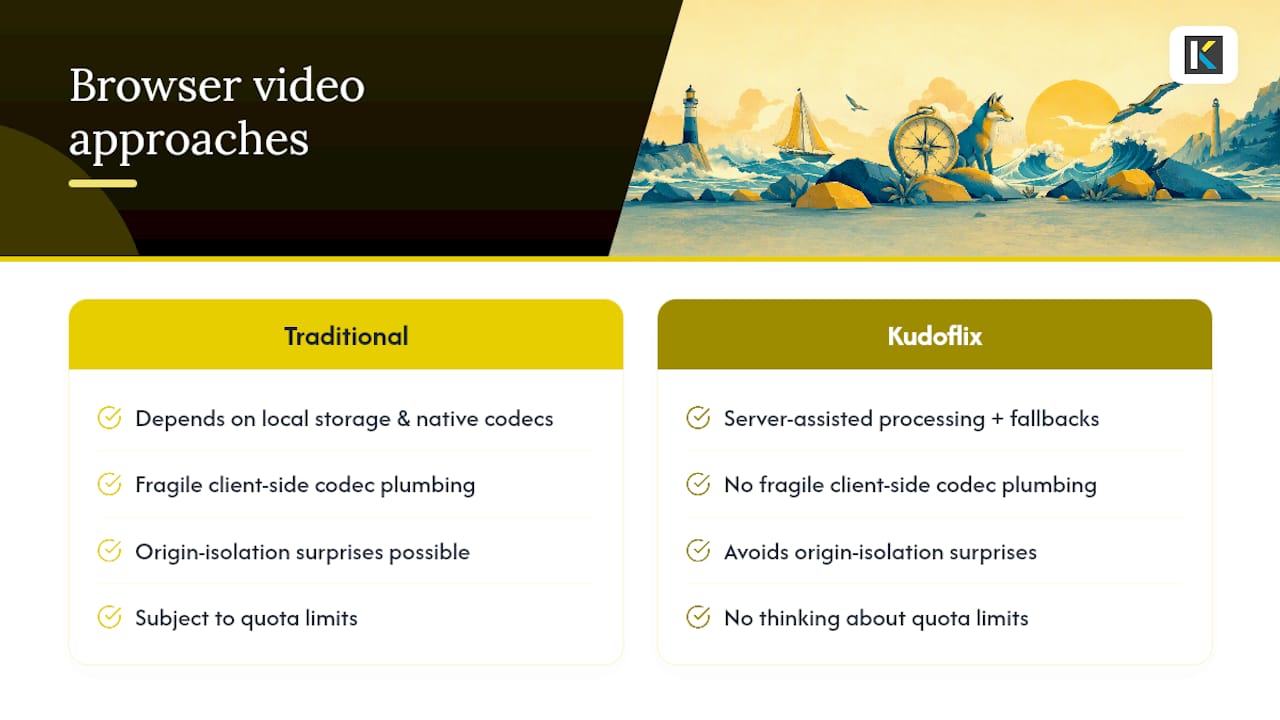
That’s the practical difference for anyone editing video in-browser: no fragile client-side codec plumbing, no origin-isolation surprises, just a browser-based video editor built to handle the heavy lifting off the client. Open a project and see how far you get before you ever have to think about quota limits or codec strings again.
Sources
- 1730419 – LocalStorage does not syncronize with local file origins
- Web features explorer – WebCodecs
Recommended