

Video transitions are visual effects that connect one video clip to another, controlling how a scene change appears to the viewer. Every cut, fade, or dissolve you see in a film, YouTube video, or social media reel is a transition at work. These effects do far more than fill the gap between clips. They shape emotional pacing, signal the passage of time, and guide where the audience focuses their attention. Whether you are editing a family vacation video or a professional brand film, understanding transitions is the single fastest way to lift your work from raw footage to a polished story.
What are video transitions, and why do they matter?
A video transition is the technique used to move from one shot or scene to the next. The industry term is “film transition,” and it covers everything from the simplest straight cut to complex motion-based effects planned during filming. Transitions control emotional pacing, meaning the type you choose directly shapes how the audience feels at that moment. A hard cut creates energy and urgency. A slow dissolve creates softness and reflection. That distinction alone changes the entire tone of a scene.
Transitions also serve a structural role. They tell the viewer that something has changed: location, time, character focus, or mood. Without them, even well-shot footage feels like a slideshow. With the right ones, your video breathes and flows like a story.

What are the main types of video transitions?
Common transition types include cuts, fades, dissolves, wipes, and match cuts. Each serves a specific narrative or emotional function, and knowing when to use each one is what separates competent editing from great editing.
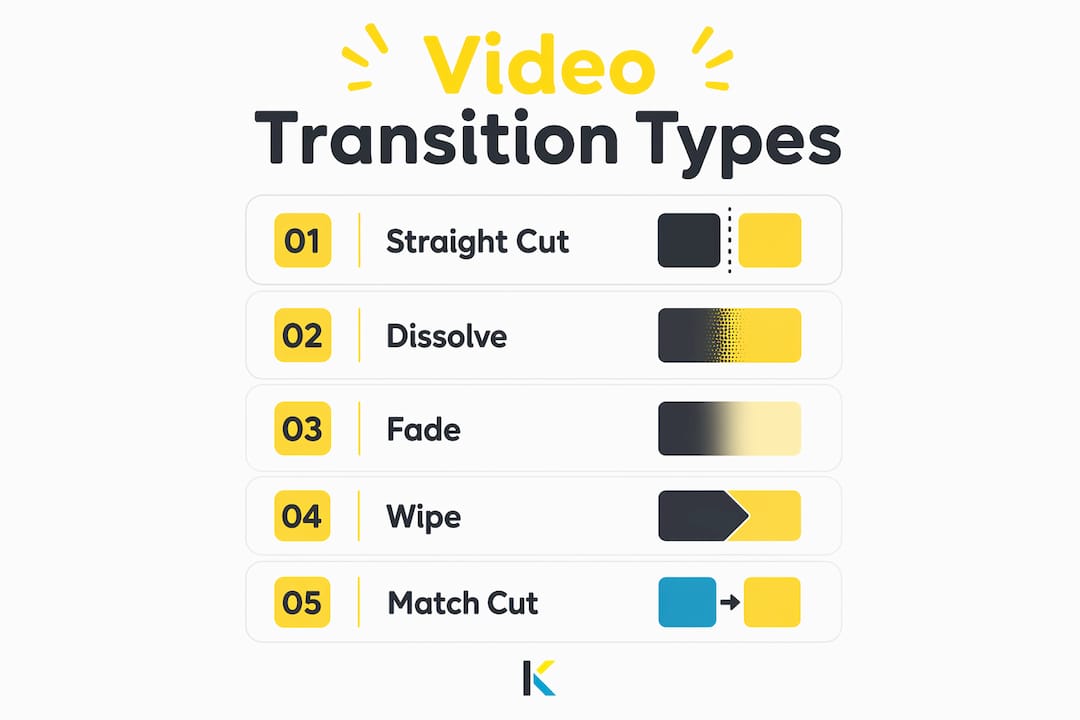
| Transition | What it does | Best used for |
|---|---|---|
| Straight cut | Instantly replaces one image with another | Fast-paced action, dialogue, high energy |
| Dissolve | Blends two shots together briefly | Emotional moments, memory sequences |
| Fade to black | Fades the image to black before the next scene | Act endings, passage of time |
| Wipe | A line travels across the frame to reveal the next shot | Genre films, stylized content |
| Match cut | Cuts on a visual or motion similarity between two shots | Cinematic storytelling, creative flow |
The straight cut is the most used transition in professional editing. Its power comes from invisibility. When executed well, the viewer does not notice it at all. Dissolves work differently. They blend two shots together for a brief overlap, which signals softness, nostalgia, or emotional weight. Fades to black commonly open or close acts, marking a clear narrative boundary. Wipes travel across the frame to reveal the next scene and work best in stylized or genre-specific content. Match cuts are the most creative of the group. They cut on a shared visual element between two shots, such as a spinning wheel in one scene matching a spinning planet in the next.
Pro Tip: Use dissolves sparingly. One well-placed dissolve in a five-minute video carries far more emotional weight than ten scattered throughout.
How to use video transitions effectively in editing
The most common mistake creators make is treating transitions as decoration. Overusing flashy transitions creates a choppy, amateur feel and breaks the viewer’s focus. Experienced editors apply transitions with purpose, not habit.
Here are the core best practices for applying transitions well:
- Match the transition to the scene’s tone. A hard cut fits an argument scene. A soft dissolve fits a reunion.
- Control the duration. A dissolve that lasts too long feels sluggish. One that is too short feels like a glitch. Transition length directly modulates pacing and viewer perception.
- Do not add a transition between every clip. Most professional timelines use straight cuts for 80–90% of edits. Transitions appear only where the story needs them.
- Sync transitions to audio cues. A beat drop, a word, or a sound effect landing exactly on a cut makes the edit feel intentional and satisfying.
- Keep variety minimal. Using five different transition styles in one video signals inexperience. Pick one or two and use them consistently.
Audio integration is critical to transition impact. A visual cut that lands on a musical beat feels natural. The same cut placed randomly feels jarring. This is why professional editors often build their edit around the audio track first, then place transitions where the sound gives them permission.
Pro Tip: Before you add any transition, ask: does this serve the story, or does it just look interesting? If the answer is the latter, use a straight cut instead.
What are the modern trends in video scene transitions?
Creative transition techniques have expanded significantly, especially for short-form social media content. Creators now plan transitions during filming rather than relying entirely on post-production effects. In-camera transitions like whip pans, lens covers, and jump cuts planned on set produce a more cohesive final video than flashy digital effects added later. The result feels organic because the movement is real.
The biggest shift in 2026 is the rise of AI-assisted transition workflows for viral content. Creators building short-form videos for platforms like TikTok and Instagram Reels now use hook transitions, which are fast, dynamic effects designed to capture attention in the first two seconds of a video.
- Plan the shot with the transition in mind. A whip pan only works if both clips end and begin with matching motion direction.
- Use AI tools to generate motion-based transitions. Workflow integrations like Kling 3.0 and Nano Banana 2 are standard techniques in viral short-form production as of 2026.
- Layer sound design with visual movement. AI tools like ElevenLabs complement visual transition effects with voice modulation and sound effects that amplify emotional impact.
- Test transition timing at different playback speeds. What looks right at normal speed may feel slow on a mobile screen where viewers scroll fast.
Platforms reward videos that hold attention past the first three seconds. A well-executed hook transition does exactly that. It creates visual surprise without confusing the viewer, which keeps them watching. Check out current video editing trends to see how creators are applying these techniques across different formats.
How do transitions influence viewer perception and storytelling?
Transitions are psychological tools as much as technical ones. Different transitions trigger specific emotional responses in viewers, and skilled editors use this deliberately. A hard cut between two characters in conflict raises tension. A dissolve between the same characters after resolution softens the emotional landing.
Fades carry a specific meaning that audiences recognize instinctively. A fade to black signals an ending, a death, or the close of a chapter. A fade from black signals a beginning. These conventions are so deeply embedded in film grammar that breaking them without intention confuses the viewer.
Movement-based transitions, like match cuts and whip pans, guide the eye across the edit. They create continuity of motion that makes the scene change feel physical rather than digital. This is why balancing simple cuts with selective dissolves and movement transitions produces videos that feel polished and engaging. The variety serves the story without drawing attention to the editing itself.
Audio-visual harmony in transitions is the detail most beginners overlook. When a sound effect, music beat, or spoken word lands exactly on a visual transition, the brain processes the edit as natural. When they are out of sync, the viewer feels something is off without knowing why. Pairing royalty-free music with transitions is one practical way to build that harmony from the start.
Pro Tip: Watch your edited video with your eyes closed. If the audio alone tells a clear story with natural rhythm, your transitions are probably working. If it sounds choppy or random, the visual edits are fighting the audio.
Key Takeaways
Video transitions are not decoration. They are storytelling tools that control emotional pacing, guide viewer attention, and define the rhythm of your video.
| Point | Details |
|---|---|
| Transitions serve the story | Every transition should have a narrative reason, not just a visual one. |
| Straight cuts dominate professional editing | Use cuts for most edits and reserve dissolves or wipes for emotional moments. |
| Timing and duration shape mood | Longer transitions slow pacing; shorter ones increase energy and urgency. |
| Audio sync makes transitions land | Matching visual cuts to audio cues makes edits feel natural and intentional. |
| In-camera planning beats post-production effects | Transitions planned during filming produce more cohesive results than digital overlays. |
Why restraint is the hardest skill in transition editing
I have reviewed hundreds of videos from creators at every level, and the pattern is consistent. Beginners reach for flashy transitions because they feel like progress. Spinning effects, glitch overlays, and zoom blurs look exciting in a preview window. On a finished video, they announce that the editor was more interested in the tools than the story.
The editors whose work I find most impressive are the ones you cannot catch editing. Their cuts land on beats. Their dissolves appear exactly when the emotion needs softness. Their match cuts feel like magic because the shot was planned before the camera rolled, not fixed in post. That level of craft comes from treating transitions as a last resort rather than a first instinct.
The practical lesson I keep returning to is this: plan your transitions before you film, not after. A whip pan, a lens cover, or a simple walk-through-a-door transition costs nothing to shoot and produces results that no digital effect can replicate. The in-camera transition approach is the single most underused technique among creators who are serious about improving their work.
Experiment freely, but always ask whether the transition serves the viewer or just entertains you as the editor. Those are two very different questions with very different answers.
— Mandrixx
How Kudoflix makes applying transitions straightforward
Transitions are one of the most powerful tools in video editing, and they should not require a steep learning curve to use well.

Kudoflix is an online video editor built for creators at every level, with no downloads or installations required. Its library includes effects, transitions, and text accessible in a few clicks, so you spend time on your story rather than hunting through menus. Ready-made templates handle the structural work, letting you focus on timing and tone. For creators who want to see what is possible before committing, the Kudoflix video examples page shows real finished projects built with the platform. If you are ready to build professional videos with a simple tool, Kudoflix gives you the transitions, effects, and speed to do it without the technical friction.
FAQ
What is a video transition in simple terms?
A video transition is a visual effect that connects two video clips, controlling how one scene changes into the next. Common examples include cuts, fades, and dissolves.
What is the most used video transition in professional editing?
The straight cut is the most frequently used transition in professional video editing. It instantly replaces one image with another and creates a clean, high-energy edit when timed correctly.
What are transition effects in video editing?
Transition effects are the specific visual techniques applied between clips, such as dissolves, wipes, fades to black, and match cuts. Each effect carries a different emotional signal for the viewer.
How do I avoid overusing video transitions?
Apply transitions only where the story requires a change in tone, time, or location. Use straight cuts for most edits and reserve dissolves or wipes for moments that need emotional emphasis.
What are viral hook transitions?
Hook transitions are fast, dynamic effects used at the start of short-form social media videos to capture viewer attention within the first two seconds. They often combine in-camera movement with AI-assisted audio and visual effects.
Recommended