

Kudoflix is the strongest no-download alternative to GetShorts.app for creators who want template-driven short videos published directly to social platforms without touching a single setting. Its brand kit stores your colors, fonts, and watermark once, then applies them across every clip automatically. If you need AI to scan a three-hour stream and pull the best 90 seconds, a dedicated AI clipper hub fits better.
Quick shortlist by need:
- Template-first web editor (fast brand consistency, direct posting, no install): Kudoflix
- AI clipper hub (automated highlight extraction from long-form content): category tools that analyze full video before cutting
- All-in-one web editor (broad asset library, design-heavy projects): browser-based platforms with graphic design roots
- Lightweight mobile-to-web editor (quick phone edits synced to browser): apps with automatic cloud sync across devices
Table of Contents
- How do these GetShorts.app alternatives compare side by side?
- What does each alternative actually feel like to use?
- How do you pick the right GetShorts.app alternative for your workflow?
- How do these tools fit real publishing workflows?
- Which alternative should you actually start with?
- How does customer support compare across these categories?
- What devices and browsers do these tools actually require?
- What should you know about security and privacy?
- What do users say about these tools?
- How well do these tools integrate with other software?
- Key Takeaways
- The tool category nobody talks about honestly
- Kudoflix: the no-download editor built for creators who want results fast
How do these GetShorts.app alternatives compare side by side?
| Category | Best For | Ease of Use | Web-Based | Templates & Effects | Export / Resolution | Social Integrations | Analytics | Processing Speed | Pricing Shape |
|---|---|---|---|---|---|---|---|---|---|
| Kudoflix | Short-form social clips, brand consistency | Very easy | Yes, no install | Extensive exclusive library | Multiple formats, HD | Direct posting to major platforms | Native insights | Fast server-side | Free tier + paid plans |
| AI clipper hub | Long-form repurposing, streamers | Moderate | Web + mobile | Community templates | Up to 1080p | TikTok, Shorts, Reels, LinkedIn | Per-clip viral score, watch time | Priority render on paid | Free tier; paid plans available |
| All-in-one web editor | Design-heavy content, teams | Moderate learning curve | Yes | Very large, generic-heavy | HD, some 4K on paid | Limited native posting | Basic export stats | Moderate | Free tier; paid plans available |
| Template-first browser editor | Meme-style clips, subtitles | Easy | Yes | Good, community-driven | Up to 1080p | Some direct posting | Limited | Fast | Free tier; paid plans available |
| Mobile-to-web lightweight editor | On-the-go creators, casual clips | Very easy | Partial (app-first) | Moderate | Up to 4K on paid | Manual export, limited scheduling | Minimal | Fast on device | Free; paid from ~$10/mo |
Pricing and free-tier signals to know:
- Kudoflix offers a free tier with access to core editing features before any payment commitment.
- AI clipper hubs often charge by credit per clip, not by subscription seat, so heavy repurposers should watch credit models carefully (https://kudoflix.com/blog/2026/06/28/online-video-editing-tools-3-alternatives).
- All-in-one web editors frequently watermark exports on free plans.
- The best tools for nontechnical creators are fully browser-based with no download required.
What does each alternative actually feel like to use?
Kudoflix
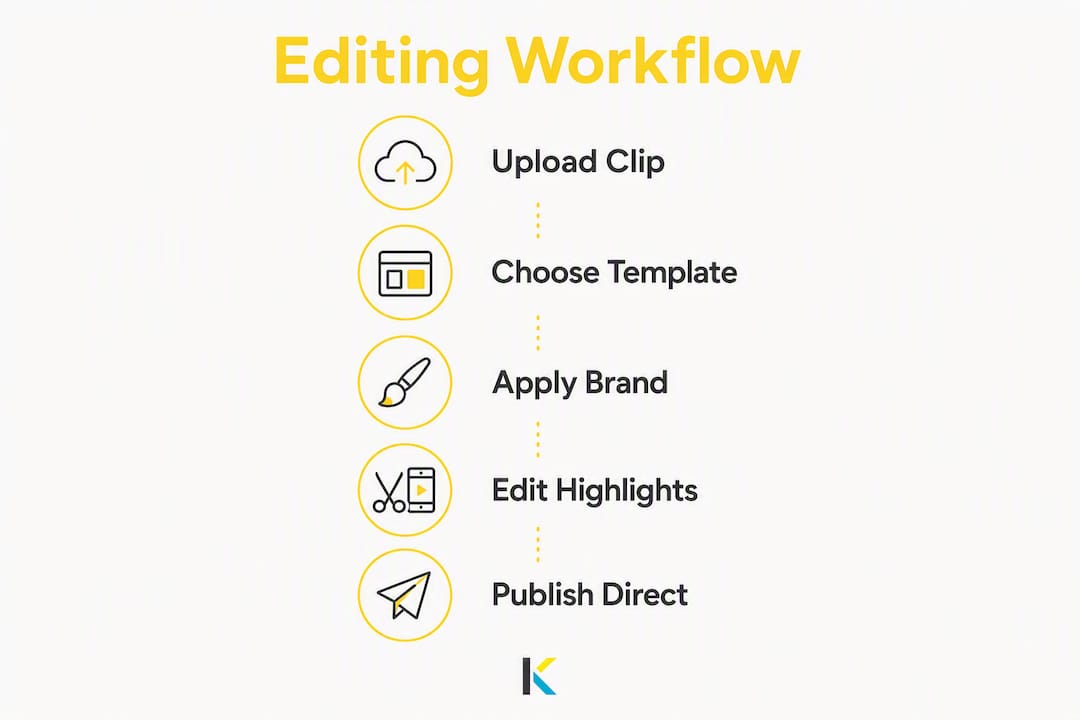
Kudoflix runs entirely in your browser. Upload a clip, pick a template from its exclusive library, drop in your brand kit, and you’re posting to YouTube Shorts or Instagram Reels within minutes. The video editor use cases span social clips, course promos, family videos, and business presentations, which means the template range actually reflects real creator needs rather than generic stock designs. Server-side processing keeps things fast even on slower connections.
Pros: No download, brand kit saves setup time, direct social posting, fast processing
Cons: Less suited for AI-automated highlight extraction from multi-hour content
AI clipper hub
These tools read an entire video before deciding what to cut, which is genuinely different from fixed-interval clipping. They cross-reference retention peaks, emotional tone, and narrative tension to score each potential clip. Useful for podcasters and streamers. The trending workflow research confirms that cross-posting and native analytics are now table stakes for this category.
Pros: Automated highlight detection, multi-platform scheduling, per-clip viral scores
Cons: Credit-based billing can surprise heavy users; steeper learning curve for the dashboard

All-in-one web editor
Think graphic design platform that added video. The asset libraries are enormous, but a lot of templates skew toward presentations and social graphics rather than short-form video. Direct posting exists but is limited compared to dedicated video tools. Good for teams that already live in a design tool and want video as an add-on.
Pros: Huge asset library, strong team collaboration, familiar to designers
Cons: Video-specific features feel secondary; analytics are minimal
Template-first browser editor
Optimized for subtitle-heavy clips and meme formats. Fast to learn, solid for repurposing talking-head content with captions. Direct posting coverage varies by plan. Analytics are thin, so you’ll rely on platform-native data after export.
Pros: Quick subtitle workflows, easy interface, good for caption-heavy content
Cons: Limited analytics, fewer advanced effects
Lightweight mobile-to-web editor
App-first tools that sync to a browser. Great for creators who shoot on their phone and want to edit immediately. Export quality tops out at 4K on paid tiers, but direct scheduling and cross-posting are limited. Minimal analytics.
Pros: Excellent mobile experience, fast for casual clips, cloud sync
Cons: Web version often lags behind the app; weak publishing integrations
How do you pick the right GetShorts.app alternative for your workflow?
Checklist before you commit:
- What is your primary goal: brand awareness, monetization, education, or community?
- How many clips do you publish per week?
- Do you need direct posting, or is manual upload fine?
- Does the tool save your brand kit (colors, fonts, watermark) between sessions?
- Do you need native analytics, or will platform dashboards cover you?
- What export resolution do you need (1080p vs. 4K)?
- What is your monthly budget, and does the pricing model charge per clip or per seat?
Questions to ask during any free trial:
- How are credits counted — per clip, per minute of source video, or per export?
- Can I cross-post to multiple platforms from one dashboard?
- Is my brand kit saved automatically for the next session?
- Does the free tier watermark my exports?
- How long does a 60-second clip take to process and export?
Red flags that should stop you from signing up:
- Hidden credit charges that only appear after you’ve uploaded content
- Watermark-only free tier with no way to test the real output quality
- No direct posting or scheduling on any paid plan
- Analytics limited to a download count with no watch-time data
Pro Tip: In your first 10 minutes of any trial, create a 15–30 second clip, apply your brand kit, and attempt to publish to a test account. If any of those three steps requires a tutorial, the tool is too complex for your workflow.
How do these tools fit real publishing workflows?
Platform-native analytics — reach, average watch time, and retention peaks — matter more than export-only tools because they let you adjust the next clip based on what the last one actually did. Exporting a file and checking stats separately breaks the iteration loop.
Three workflow patterns where these tools earn their keep:
- Daily short-form schedule: Upload raw footage, apply a saved template and brand kit, export at 1080p, and post directly. Kudoflix’s server-side processing means you’re not waiting for a local render. The 2026 short-form best practices emphasize short hooks and platform-specific sizing — both handled by template presets.
- Repurposing long-form content: A 45-minute podcast episode becomes five 60-second clips. AI clipper hubs automate the selection; template-first editors handle the caption overlay. The key is a tool that batches export and schedules across platforms in one step.
- Coach or educator promos: Short course previews need consistent branding more than viral scoring. A brand kit that applies your logo and color palette in one click cuts per-video setup from minutes to seconds.
Pro Tip: Save your brand kit on day one. Creators who set it up at the start report cutting per-video production time significantly compared to applying branding manually each session.
Cross-posting from a single dashboard saves hours weekly versus manual export-and-upload. Server-side rendering means the platform’s servers do the heavy work, so a slow laptop is not a bottleneck.
Which alternative should you actually start with?
Kudoflix is the right first test for nontechnical creators who want a no-download editor with templates, brand kit, and direct social posting in one place.
- Why Kudoflix first: The combination of an exclusive template library, fast server-side processing, and direct posting covers the core workflow without a learning curve. You can see real output quickly.
- When to look elsewhere: If your primary need is automated AI highlight extraction from streams or podcasts over an hour long, an AI clipper hub handles that job better.
3-step trial plan:
- Sign up for Kudoflix’s free tier — no download, no install.
- Run the 10-minute test: create a 15–30 second clip, apply your brand kit, and post to a test account.
- Check the native analytics after 24 hours and compare reach and watch time against your previous tool.
How does customer support compare across these categories?
Kudoflix provides support through its documentation and help resources, accessible directly from the browser interface. AI clipper hubs at the paid tier typically offer priority support queues and community forums. All-in-one web editors with large user bases tend to have extensive self-serve knowledge bases but slower human response times on free plans. Template-first editors vary widely. The consistent pattern: paid plans get faster human support across every category, and free-tier users rely on documentation and community threads.
What devices and browsers do these tools actually require?
Kudoflix runs in any modern browser with no installation. Chrome and Edge deliver the most consistent experience for browser-based editors generally. AI clipper hubs typically offer web plus iOS and Android apps with automatic cloud sync. All-in-one web editors are browser-first with mobile companion apps. Lightweight mobile-to-web editors are app-first; the browser version often has fewer features. For creators working on older hardware, server-side processing tools like Kudoflix are a real advantage since the render load stays off your machine.
What should you know about security and privacy?
Every category of tool covered here stores your video files on cloud servers, so reading the privacy policy before uploading proprietary content matters. Reputable platforms publish clear data retention policies stating how long uploaded files are kept. Look for HTTPS encryption in transit and explicit statements about whether your content is used to train AI models. AI clipper hubs that process your video server-side should state clearly that your footage is not shared with third parties. Kudoflix’s architecture is web-based and does not require local software installation, which reduces the attack surface compared to downloaded desktop applications.
What do users say about these tools?
Across app stores and review platforms, the consistent praise for browser-based editors centers on speed and accessibility. Users who switch from desktop software most often cite the elimination of install friction and the ability to start editing on any device as the top benefits. Template quality and brand kit functionality draw positive mentions for tools that offer them. The most common complaints across all categories: credit billing surprises on AI tools, watermarks on free exports, and limited analytics on entry-level plans. Kudoflix’s positioning around simplicity and no-download access aligns directly with what reviewers flag as the deciding factor when choosing between similar apps.
How well do these tools integrate with other software?
Direct social integrations are the most practically useful connection for short-form creators. Kudoflix supports posting to major social platforms. AI clipper hubs tend to offer the broadest scheduling integrations, connecting to TikTok, YouTube Shorts, Instagram Reels, LinkedIn, and others from a single dashboard. All-in-one web editors often connect to cloud storage services like Google Drive and Dropbox. Template-first editors vary. For teams using project management tools, check whether the editor supports shared workspaces or folder-level organization, since that determines whether collaboration scales beyond one person.
Key Takeaways
Kudoflix is the most practical no-download alternative to GetShorts.app for nontechnical creators who need templates, brand kit, and direct social posting without a learning curve.
| Point | Details |
|---|---|
| Recommended pick | Kudoflix covers templates, brand kit, and direct posting in a fully browser-based editor. |
| Top decision criteria | Match the tool to your goal: brand consistency, AI automation, or design-heavy projects. |
| Red flag to avoid | Hidden credit charges and watermark-only free tiers prevent you from testing real output quality. |
| Trial test to run | Create a 15–30 second clip, apply your brand kit, and post to a test account in the first 10 minutes. |
| Kudoflix advantage | No download, fast server-side processing, and an exclusive template library make it the fastest starting point. |
The tool category nobody talks about honestly
Most “alternatives” articles treat every tool as roughly equal and let you pick by price. That framing misses the actual decision. The real split is between tools that help you make a video and tools that help you distribute one. Most creators need both, but they are not the same thing, and conflating them leads to picking an AI clipper hub when what you actually needed was a brand-consistent template editor, or vice versa.
The other thing worth saying plainly: complexity is a hidden cost. A tool that requires 20 minutes of setup per clip is not free even if the subscription is. The creators who get the most out of short-form publishing are the ones who reduced per-video friction to near zero, usually by locking in a brand kit and a template on day one and never touching those settings again. That is not a feature most tools advertise loudly, but it is the one that actually determines whether you publish consistently or abandon the tool after two weeks.
Kudoflix: the no-download editor built for creators who want results fast
If you’ve been comparing GetShorts.app alternatives and want to skip the setup friction entirely, Kudoflix is worth trying first. It runs in your browser, requires no installation, and gives you an exclusive template library, brand kit, and direct social posting in one place. The free tier lets you test the full editing workflow before committing to anything.
Start with the professional video editor, apply your brand kit, and post your first clip to a test account. That 10-minute test tells you more than any feature comparison. For creators focused on social distribution, the social video editor page covers the platform integrations in detail.
Recommended