The best starter picks are short documentaries, how-to tutorials, PSAs, book trailers, stop-motion animation, and one-take interview segments. Pick based on three things: how much class time you actually have, how comfortable students are with editing, and what skill you’re grading. A two- to three-minute cap keeps students focused on storytelling instead of getting lost in editing software, which is where most classroom video projects quietly fall apart.
Here’s a copy-paste starting point for any of these:
- “Create a [DURATION]-minute [FORMAT] that explains/argues/documents [TOPIC] for an audience of [WHO]. Submit a storyboard first.”
Pro Tip: If this is your first video assignment with a class, start with a tutorial or PSA before attempting narrative fiction. Both formats have built-in structure, which means less time spent explaining plot to confused ninth graders.
Key Takeaways
Scaffolded video assignments with formative checkpoints and short durations produce stronger student work than single high-stakes final submissions.
| Point | Details |
|---|---|
| Start short | Cap early projects at two to three minutes to keep the focus on storytelling, not editing. |
| Require a storyboard | A pre-filming storyboard or shot list prevents wasted footage and disorganized final cuts. |
| Grade in stages | Treat script drafts and rough cuts as low-stakes checkpoints, saving most of the grade for the final cut. |
| Match tools to the classroom | Browser-based editors avoid install issues on shared school devices. |
| Use Kudoflix for friction-free editing | Kudoflix’s no-download browser editor and built-in templates help teachers assign and grade video projects without technical setup delays. |
Table of Contents
- 25+ Classroom Video Assignment Ideas by Type
- Adapting Video Assignments by Grade and Subject
- Building the Scaffold: From Script to Final Cut
- Tools, Capture Tips, and Copyright Basics
- Managing Time, Groups, and Permissions
- Copy-Ready Prompts and a Sample Rubric
- What the Research Says About Video-Based Learning
- How Kudoflix Removes the Technical Friction
- Sources
25+ Classroom Video Assignment Ideas by Type
Every idea below includes a one-line prompt, a realistic duration, and a note on how to adjust it for different skill levels. Use the duration bands as a planning shortcut: micro (30 to 60 seconds), short (1 to 3 minutes), and extended (3 to 7-plus minutes).
Narrative and short film
- Historical reenactment scene. “Recreate a pivotal 2-minute moment from [event/book] using dialogue you write yourselves.” Short format, works in pairs, low-tech friendly with phone cameras.
- Modernized fable or myth. “Retell a classic story in a present-day setting, keeping the moral intact.” Extended format for groups of 4, high-tech optional (green screen, sound effects).
- Silent film challenge. “Tell a complete story in 90 seconds with no dialogue, only music and visuals.” Micro format, individual or pairs, forces visual storytelling skill.
Documentary and report
- Mini-documentary on a local issue. “Interview two people affected by [community topic] and present both perspectives.” Extended format, groups of 3 to 4, requires basic interview planning.
- “A day in the life” profile. “Document a typical day for someone in a career or role tied to your unit.” Short format, individual work, good low-tech option.
- Photo essay with narration. Instead of full-motion footage, students narrate over a sequence of still images. This works well for history and archive-based topics where primary source photos carry more weight than reenactments. Short format, individual, very low-tech.
Instructional and tutorial
- Skill demonstration. “Teach a specific skill (a math method, a lab technique, a grammar rule) in under 2 minutes.” Short format, pairs work well, moderate tech.
- Science lab walkthrough. “Record and narrate a lab procedure, flagging safety steps as you go.” Short to extended, groups of 2 to 3.
- Study guide video. “Create a review video for one unit concept that a struggling classmate could use.” Micro to short, individual, excellent for flipped-classroom reuse.
PSA and advocacy
- Public health or safety PSA. “Convince your audience to change one specific behavior in 60 seconds.” Micro format, pairs, minimal tech required.
- Environmental action spot. “Make the case for one concrete action tied to your science or social studies unit.” Short format, groups of 3.
- Digital citizenship PSA. “Warn peers about one specific online risk and offer a solution.” Micro format, individual or pairs.
Video essay and argument
- Persuasive video essay. “Argue a position on [debatable topic] using at least two pieces of evidence.” Extended format, individual, higher-skill editing (text overlays, cutaways).
- Compare and contrast essay. “Use split-screen or side-by-side clips to compare two texts, characters, or historical figures.” Extended, pairs, moderate to high tech.
- Data storytelling video. “Turn one chart or dataset from math or science class into a narrated explanation.” Short format, individual.
News, reporting, and interview
- Classroom news broadcast. “Report on three ‘headlines’ from your current unit as if you were a news anchor.” Short format, groups of 4 to 5, rotating roles.
- Expert interview segment. “Interview a teacher, parent, or community member with relevant knowledge.” Short format, pairs.
- Weather-report-style explainer. “Explain a science concept (climate, geology, chemistry) using a news-anchor delivery style.” Micro format, individual.
Animation and stop-motion
- Stop-motion vocabulary explainer. “Use clay, paper cutouts, or drawings to define and illustrate one term.” Micro format, pairs, works with zero video experience.
- Timeline animation. “Animate a sequence of historical or scientific events using simple stop-motion.” Short format, groups of 3.
- Character-based math story. “Animate two characters solving a word problem step-by-step.” Short format, pairs.
Social-short formats
- 15-second concept summary. “Explain one vocabulary term or formula in vertical video format, TikTok-style.” Micro format, individual, near-zero prep time.
- Trend remix explainer. “Apply a popular short-video structure (before/after, top 3, POV) to a curriculum topic.” Micro format, pairs.
- Book trailer. “Create a 60-second trailer that sells your independent reading book like a movie.” Micro to short, individual.
Reflective and personal narrative
- Learning journey reflection. “Document your growth on one skill over the semester using clips or narration.” Short format, individual, great for portfolio units.
- Identity or heritage story. “Share a personal story tied to your background or community.” Short to extended, individual, sensitive topic requiring clear guidelines.
Portfolio and compilation
- Semester highlight reel. “Compile your three best pieces of work into a narrated portfolio video.” Short format, individual, works at any grade level.
- Class time capsule. “Combine short clips from every student into one collaborative video.” Extended format, whole class, needs a coordinating editor role.
Adapting Video Assignments by Grade and Subject
Elementary students need shorter timelines, more scaffolding, and simpler tools. Middle schoolers can handle group collaboration and basic editing. High schoolers can manage full pre-production, multi-role teams, and independent editing decisions.
Elementary (K to 5): Expect one to two class periods total. Keep groups at 2 to 3 students with heavy teacher modeling. Assessment should focus on content understanding, not production polish. A stop-motion vocabulary video or a silent-film retelling works well here.
Middle school (6 to 8): Budget three to five class periods across a week or two. Groups of 3 to 4 work best, with a moderate scaffolding level (templates for storyboards, sample scripts). Assessment splits between content accuracy and basic production quality. PSAs and mini-documentaries fit this age group naturally.
High school (9 to 12): Plan for one to three weeks depending on complexity. Groups of 2 to 5, with light scaffolding since students can self-direct pre-production. Assessment weighs argument quality, evidence, and production choices equally. Video essays and multi-source documentaries suit this band.
| Subject | Sample adaptation |
|---|---|
| ELA | Book trailer or character-perspective video essay |
| History/social studies | Photo essay narrating a primary-source event |
| Science | Lab demonstration or data storytelling video |
| Math | Animated word-problem walkthrough |
| Art | Stop-motion piece exploring a technique or movement |
| World language | Dialogue-based skit filmed entirely in the target language |
For English learners, allow scripts to be written first in either language and let students narrate in their target language once they’re comfortable. For students with IEPs or 504 plans, offer role flexibility (research, editing, narration) so on-camera performance isn’t the only path to a good grade. In classrooms with limited devices, favor group projects where one phone or tablet serves 4 to 5 students, and build in rotating access blocks rather than assuming one-to-one technology.
Building the Scaffold: From Script to Final Cut
A single high-stakes video submission almost always produces worse work than a staged process. Formative checkpoints, including drafts and peer review sessions, consistently outperform one-shot final submissions because students catch problems early instead of discovering them the night before the deadline.
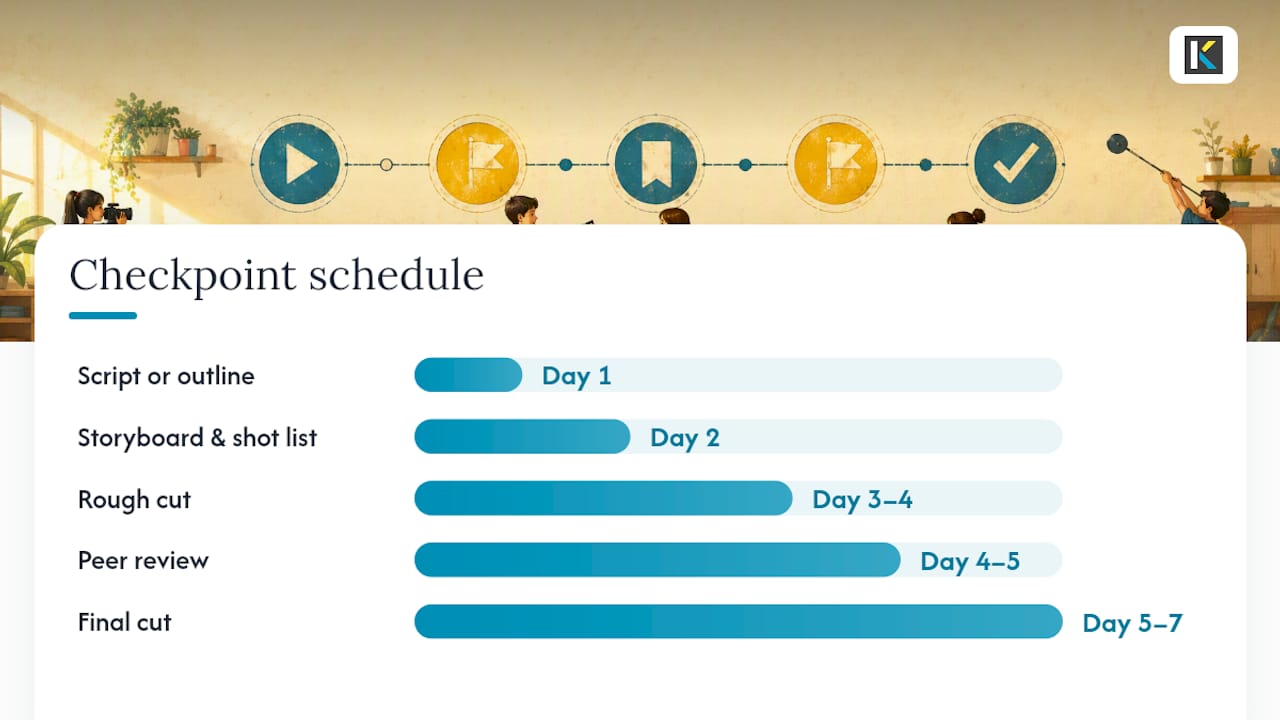
Here’s a five-checkpoint scaffold that works across grade levels:
- Script or outline (Day 1). Students submit a written script or bulleted outline before touching a camera.
- Storyboard and shot list (Day 2). A simple storyboard, even a rough sketch grid, prevents wasted filming time later.
- Rough cut (Day 3 to 4). A first assembled draft, even with placeholder audio, submitted for teacher or peer check-in.
- Peer review (Day 4 to 5). Students trade rough cuts and give feedback using a short structured form.
- Final cut (Day 5 to 7). Polished version submitted with captions and any required credits.
A workable rubric covers five categories: communication of the core idea, accuracy of content or evidence, production quality (audio clarity, framing, pacing), collaboration and role fulfillment, and accessibility (captions or a transcript included). Ready-made digital video rubrics typically score each category on a 4-point scale, with a total out of 20, and can be adapted directly for K to 12 use.
For peer review, keep the form to three questions: What worked? What was confusing? What’s one specific fix? Grade the storyboard and rough cut as low-stakes formative checkpoints (participation credit), reserving the bulk of the grade for the final cut. This protects students who struggle with pacing early but improve with feedback.
Tools, Capture Tips, and Copyright Basics
For editing, browser-based tools remove the biggest classroom obstacle: installation delays and compatibility issues on school devices. Kudoflix works entirely in the browser with no downloads, which matters when you’re managing 30 Chromebooks with limited storage. It also ships with ready-made video templates that give students a structural head start instead of a blank timeline. WeVideo and Clipchamp are two other browser-based options worth knowing, both offering cloud-based editing with varying template libraries and export limits depending on plan tier.
For capture, three things matter more than camera quality: steady framing (prop the phone against something), decent audio (record close to the speaker, avoid hallway noise), and manageable file sizes (export at 720p for most classroom uploads rather than 4K, which chokes school Wi-Fi and LMS storage limits).
Before publishing anything outside the classroom, check three boxes: captions or a transcript for accessibility, written permission for any student who appears on camera, and confirmation that any background music is royalty-free or properly licensed.
Pro Tip: Teachers can also flip instruction by pre-recording their own short demo videos for lab setups or grammar rules, reusing the same clip every semester instead of re-explaining live each time.

Managing Time, Groups, and Permissions
Time estimates depend heavily on project length, but a rough guide helps with pacing.
| Project length | Prep/planning | Filming | Editing | Peer review |
|---|---|---|---|---|
| Micro (30 to 60 sec) | 1 class period | 1 class period | 1 class period | 15 minutes |
| Short (1 to 3 min) | 1 to 2 class periods | 1 to 2 class periods | 2 class periods | 30 minutes |
| Extended (3 to 7+ min) | 2 to 3 class periods | 2 to 3 class periods | 3 to 4 class periods | 1 class period |
Assign clear roles for group projects: producer (keeps the team on schedule), director (makes creative calls), editor (owns the final cut), on-camera talent, and researcher (fact-checks content). Groups of 3 to 4 tend to distribute these roles cleanly without anyone sitting idle.
For sharing final videos, unlisted links through school-approved platforms work well, and a QR-code gallery walk lets classmates watch each other’s projects on their own devices without needing a shared classroom screen. For permission, a short consent line on existing parent communication forms covers most needs: “My child’s image and voice may be used in a classroom video project shared only with our class or on an unlisted link for grading purposes.”
Copy-Ready Prompts and a Sample Rubric
Three prompts you can hand out today:
- Short documentary: Objective: research and present two perspectives on a real issue. Deliverables: script, storyboard, 3-minute final cut with captions. Timeline: one week. Grading: content accuracy (40%), production quality (30%), collaboration (30%).
- How-to tutorial: Objective: demonstrate mastery of a specific skill by teaching it clearly. Deliverables: shot list, 2-minute video, one practice quiz question for viewers. Timeline: three class periods. Grading: clarity (50%), accuracy (30%), production (20%).
- PSA: Objective: persuade an audience to change one behavior. Deliverables: script with a clear call to action, 60-second video. Timeline: two class periods. Grading: persuasiveness (40%), evidence used (30%), production (30%).
Sample rubric categories (4 points each, 20 total): idea communication, accuracy/evidence, production quality, collaboration, accessibility. Save these prompts as a reusable document, and export any storyboard templates as PDFs so students can print or fill them digitally.
What the Research Says About Video-Based Learning
Video projects built on drafts and check-ins beat single-submission assignments almost every time, because students revise their thinking through the process rather than only at the end. That’s the entire logic behind flipped classrooms too: teacher-created demo videos let students absorb content at their own pace, freeing class time for the messier, more valuable work of application.
A few practical takeaways follow directly from this: build in at least one formative checkpoint before the final grade, keep first-time video projects under three minutes to protect editing time, and use peer review as a built-in revision step rather than an optional extra.
A teacher’s honest take on making this work
The projects that succeed aren’t the ones with the fanciest editing. They’re the ones where students revised something based on real feedback before turning it in. Low-stakes drafts do more for learning than any single polished final cut ever will.
Pro Tip: If students are anxious about being on camera, let the first assignment be voice-over narration on still images. It removes the performance pressure while still teaching pacing and storytelling.
How Kudoflix Removes the Technical Friction
Grading forty group videos shouldn’t mean troubleshooting install errors on school laptops the night before deadline. Kudoflix runs entirely in the browser, so there’s nothing to download and no compatibility gap between a classroom Chromebook and a home laptop. That single fact solves the most common complaint teachers have about assigning video work in the first place: software that’s more complicated than the assignment itself.
Students get a working head start from the built-in template library instead of staring at a blank timeline, and captioning tools make the accessibility checkpoint from your rubric something students can actually check off themselves. Export settings are built for quick upload to an LMS, so file-size headaches mostly disappear.
Getting started takes four steps: create a free account, pick a template that fits the assignment type, upload footage or images, and share the finished video through an unlisted link for grading or a class gallery walk. If you’re planning a semester of video assignments, start with the simple, professional editing workflow built for classrooms and adapt one template to your first prompt this week.
Sources
- Video assignments — McGraw Center for Teaching and Learning
- 10 Creative Ways to Use Video in the Classroom | Edpuzzle Blog
- Digital video project rubric — OTL, University of Denver
- Video production pre-production resources — Oregon State University
- Videos – Words from the Myths | K-12 Maker Lab at MIT Edgerton Center
Downloadable rubrics and storyboard templates from these sources can be adapted directly into your LMS or printed for in-class use.
Recommended