Video A/B testing is the practice of publishing two or more controlled variants of the same video element, such as a thumbnail, opening hook, or call to action, to comparable audiences and measuring which one moves a target metric like click-through rate or conversions. Once you know that, the next move matters more than the definition.
Here’s your rapid checklist:
- Pick one variable to test (thumbnail, hook, or CTA, not all three).
- Set a single KPI before you launch, whether that’s CTR, watch time, or conversion rate.
- Split traffic evenly between variants and let the test run long enough to reach a real sample.
Pro Tip: Thumbnails and opening hooks tend to deliver the fastest, highest-leverage learning of any video test, according to Storyblocks, because they decide whether anyone watches at all. The rest of this guide walks through platforms, a step-by-step setup process, low-budget test ideas, and how to read your results without fooling yourself.
Key Takeaways
Video A/B testing works because isolating one variable, thumbnail, hook, or CTA, against a pre-set KPI turns creative guesswork into measurable, repeatable gains.
| Point | Details |
|---|---|
| Start with thumbnails and hooks | These two elements drive the most variance in CTR and retention for the least production effort. |
| Change one variable at a time | Testing a new hook and thumbnail together makes it impossible to know what caused the result. |
| Match metrics to test type | Use CTR for thumbnails, 30 second retention for hooks, and conversion rate for landing-page video. |
| Give tests enough time and traffic | Run a full week minimum and prioritize high-traffic touchpoints like landing pages first. |
| Produce variants fast with Kudoflix | Templates and export presets help teams cut a second thumbnail or hook variant in minutes, not hours. |
Table of Contents
- What Is Video A/B Testing and Why It Matters
- What Elements You Can Test in a Video
- How to Run a Video A/B Test Step by Step
- Where to Run Video A/B Tests
- Low-Budget Video Tests You Can Run Without Reshooting
- How to Analyze Results and Pick a Winner
- Common Pitfalls and Best Practices in Video Testing
- Why Testing Should Be a Habit, Not a One-Off
- Turn Test Ideas Into Variants Without the Production Slowdown
- Frequently Asked Questions
- Sources
What Is Video A/B Testing and Why It Matters
Video A/B testing means creating two or more variants of a single element, thumbnail, hook, CTA, edit, and measuring which one wins against a KPI you chose in advance, according to ScriptStorm’s framework. That’s different from casually tweaking a video and hoping it performs better. A real test isolates one variable, runs both versions to comparable audiences, and produces a result you can act on with confidence instead of a guess dressed up as a decision.
The payoff shows up across the funnel. Marketers who test systematically tend to see gains in:
- Click-through rate on thumbnails and previews
- Watch time and retention past the first 15 to 30 seconds
- Conversion rate on landing pages with embedded video
- Overall return on ad spend for video creative
A/B testing turns intuition into validated evidence, letting teams put production budget behind variants that actually move business metrics instead of the ones that just look good in a review meeting, a point Joyspace’s optimization framework makes clearly. Skip testing, and you’re spending real production dollars on a coin flip.
What Elements You Can Test in a Video
Not every part of a video deserves equal testing attention. Some elements swing performance dramatically and cost almost nothing to change. Others take real production effort for a smaller payoff. The table below breaks down where to focus first.
| Element | Funnel Stage It Affects | Effort to Produce |
|---|---|---|
| Thumbnail | Click-through rate | Low |
| Opening hook (first few seconds) | Retention / watch time | Low to medium |
| CTA placement or wording | Conversion rate | Low |
| Video length | Retention / completion | Medium |
| Background music | Engagement, mood | Low |
| Captions on/off or style | Retention, accessibility | Low |
| Speaker or presenter | Trust, conversion | High |
| Color grade or visuals | Engagement | Medium |
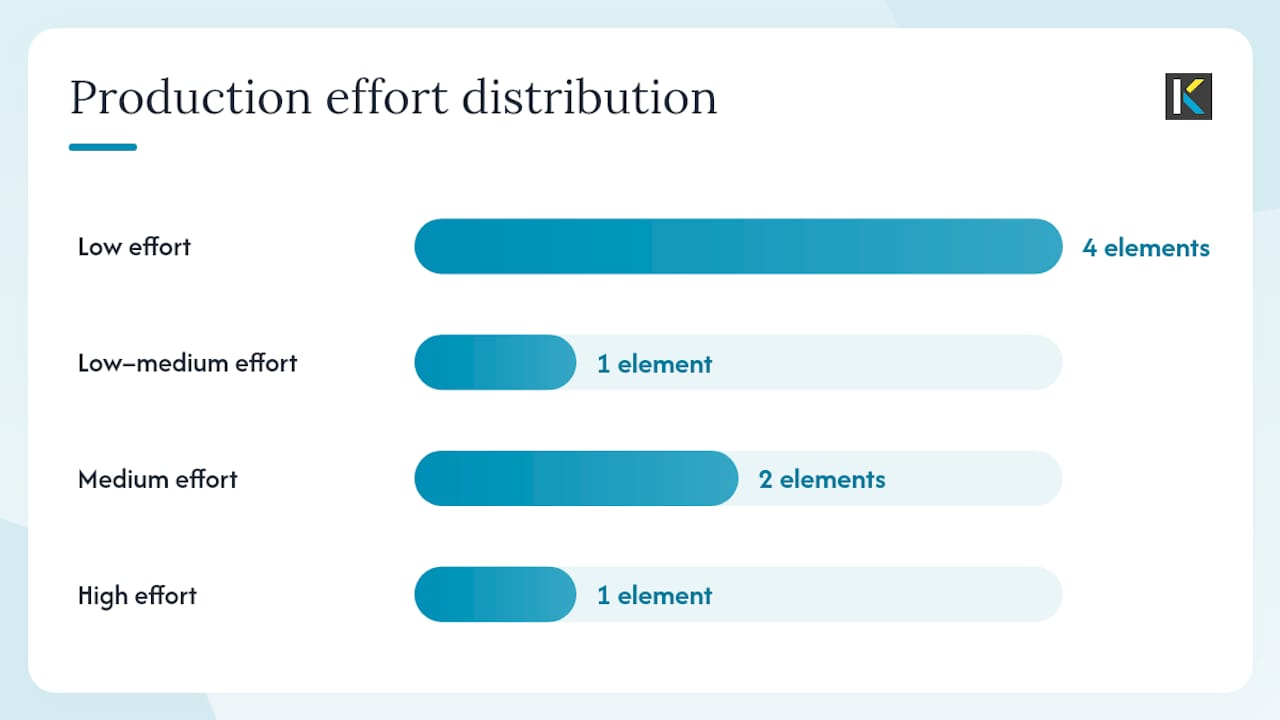
Use an ICE-style filter (Impact, Confidence, Ease) to decide what to run first. Thumbnails routinely score high on all three, which is why they’re the default starting point for most testing programs, a pattern Video Editing Company’s guide also flags for prioritization. CTA wording and placement come next: cheap to change, and they sit right at the moment a viewer decides whether to act.
Pro Tip: Before you commit to a full reshoot, test the opening hook and thumbnail on your current video. Those two elements often explain more variance in performance than anything you’d film differently.
How to Run a Video A/B Test Step by Step
A clean test starts with a hypothesis, not a hunch.
Follow this sequence:
- Form a hypothesis that names the variable, the expected direction of change, and the metric you’ll judge it by.
- Build two clean variants that differ in exactly one way. Change the thumbnail, or change the hook, never both in the same test.
- Split traffic evenly and randomly across the touchpoint you’re testing, whether that’s a landing page, a YouTube upload, or an ad set.
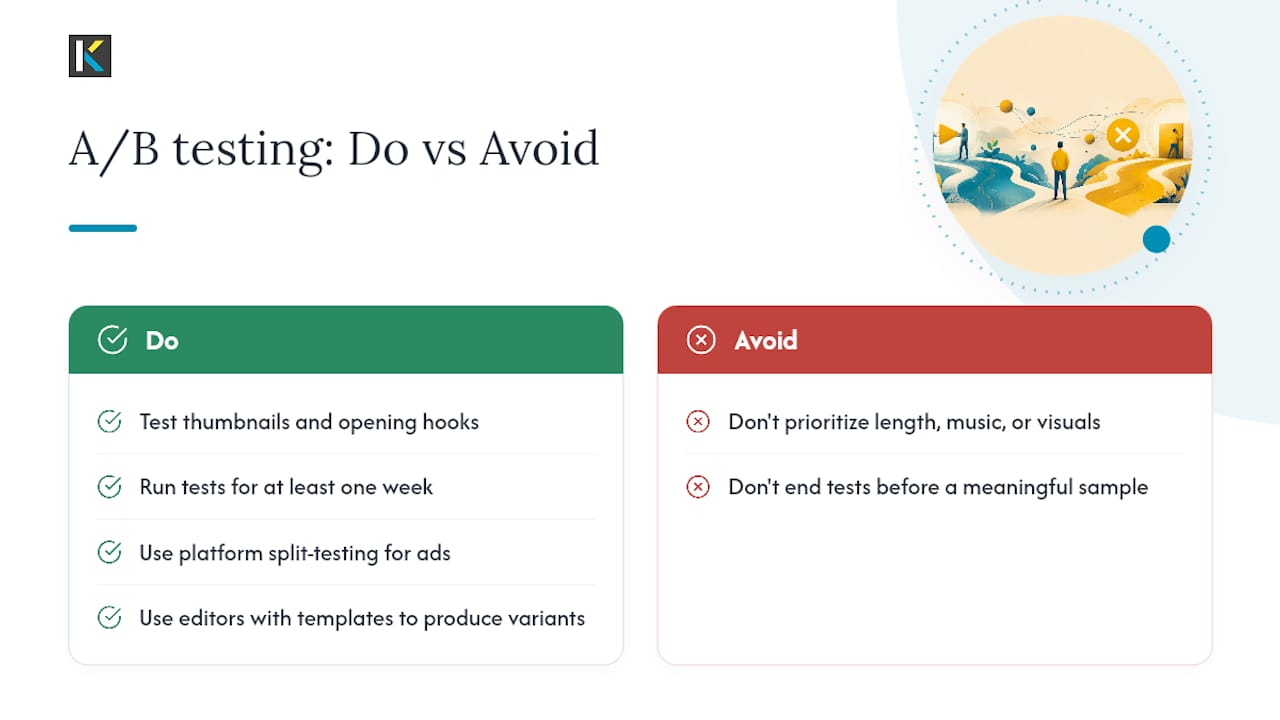
- Run the test long enough to gather a meaningful sample. High-traffic touchpoints like landing pages reach significance faster than lower-traffic discovery platforms, which is why Video Editing Company recommends starting there.
- Measure against your pre-set KPI, not whichever metric happens to look best afterward.
- Pick a winner and document why, including the sample size and duration, so the result holds up under scrutiny.
Before you launch, confirm you’re tracking the right numbers:
- CTR for thumbnail and title tests
- 15 to 30 second retention for hook tests
- Conversion rate for landing-page video tests
- Engagement events like shares, comments, or completions for brand awareness tests
Pro Tip: Resist the urge to call a winner after 48 hours. A test that looks decisive on day two frequently reverses by day seven once weekday and weekend traffic patterns even out.
Where to Run Video A/B Tests
Different platforms suit different tests, and picking the wrong one wastes time you don’t need to lose.
- YouTube’s Test & Compare lets creators upload multiple thumbnail variants and judges the winner by watch-time share rather than raw CTR, which cuts down on clickbait thumbnails winning by accident. Results typically take two to four weeks depending on channel traffic, per Video Editing Company’s guide.
- Ad platforms (Meta, TikTok, programmatic buys) support creative-level split tests, making them the natural home for testing hooks, CTAs, and video length in paid campaigns.
- Landing-page A/B tools work best for embedded video, since traffic is often high enough to reach significance in days rather than weeks.
- Wistia offers a built-in A/B testing feature for video embeds, letting you start a test, embed both variants, and view results without stitching together separate tools, according to Wistia’s own documentation.
Manual testing, swapping a video out and comparing before/after windows, still works when a platform lacks native split-testing, but it’s noisier and more vulnerable to seasonal shifts.
Pro Tip: If you need to produce several thumbnail or hook variants fast, a template-based editor cuts the production bottleneck that usually kills testing programs before they start.
Low-Budget Video Tests You Can Run Without Reshooting
You don’t need a new shoot to learn something useful. Five tests consistently deliver signal without extra production budget, according to Storyblocks’ breakdown of easy A/B tests:
- Background music on versus off, watching for changes in completion rate.
- Opening hook as a question versus a bold claim, tracking 15 second retention.
- B-roll versus talking-head opening, comparing early drop-off.
- Color grade or filter swap, watching engagement and shares.
- Plain thumbnail versus a designed graphic thumbnail, tracking CTR.
Each of these can be produced in under an hour using existing footage. Swap the audio track, trim a different opening frame, or export a second thumbnail design, then let the platform split traffic.
Pro Tip: Name and archive every variant with the hypothesis attached (e.g., “hook_question_v2_retention_test”) so six months from now you’re not guessing what you already learned.
How to Analyze Results and Pick a Winner
Match your metric to your test goal, not the other way around. A thumbnail test lives or dies on CTR. A hook test lives or dies on 30 second retention. A landing-page video test comes down to conversion rate. Mixing these up is how teams talk themselves into the wrong winner.
Sample size matters more than most marketers want to admit. A test that “wins” after 200 impressions on each variant is noise, not signal. Give the test enough volume and enough time, ideally spanning a full week to average out day-of-week effects, before declaring a result.
- Confirm the sample size is large enough to trust the gap between variants.
- Let the test run a full business cycle, not just until one version pulls ahead.
- Cross-check quantitative wins against qualitative signals like comments or heatmap drop-off points.
- Re-run a close result once before treating it as final.
Quantitative data tells you what happened. Comments and heatmaps tell you why, and that context is what makes the next test smarter instead of a repeat guess.
Common Pitfalls and Best Practices in Video Testing
Most failed tests fail for the same handful of reasons, and they’re avoidable.
- Do change one variable per test. Don’t test a new hook and a new thumbnail at the same time; you won’t know which one moved the number.
- Do run tests long enough to cover a full week. Don’t call a winner after a single high-traffic day.
- Do account for seasonal or promotional spikes. Don’t compare a Black Friday video week against a normal week and call it a fair test.
- Do log every test into a shared record. Don’t let results live only in one person’s memory or a Slack thread.
Pro Tip: Keep a running testing calendar with hypothesis, variant, KPI, and outcome for every experiment. That single document turns scattered wins into a compounding playbook.
Why Testing Should Be a Habit, Not a One-Off
Most teams run a single splashy test, call it a win, and move on. That’s the mistake. Testing pays off when it’s a recurring ritual, three to six structured tests a quarter, logged into a shared playbook that the whole team can pull from. One test tells you what worked once. A quarter of documented tests tells you what works, repeatedly, and that’s what compounds into real gains over time.
Turn Test Ideas Into Variants Without the Production Slowdown
The biggest barrier to running more video tests isn’t strategy, it’s production speed. Every hour spent wrestling with software to produce a second thumbnail or a trimmed hook is an hour a test doesn’t get run. Kudoflix removes that bottleneck: no downloads, no install, just a browser tab and an editor built to produce variants fast.
That matters directly for testing:
- Template library for quickly reformatting a hook, thumbnail, or intro without starting from scratch.
- Export presets sized for YouTube, TikTok, and Instagram so a single edit becomes multiple platform-ready variants in minutes.
- Built-in captioning to test caption-on versus caption-off retention without a separate tool.
If your testing program keeps stalling at the “who has time to cut a second version” stage, start with the Kudoflix templates library and produce your next thumbnail or hook variant today.
Frequently Asked Questions
What is video A/B testing in simple terms?
It’s publishing two versions of one video element, like a thumbnail or hook, to similar audiences and measuring which one performs better against a metric you picked beforehand.
How long should a video A/B test run?
Long enough to cover a full week and gather a meaningful sample. High-traffic landing pages reach significance faster than lower-traffic discovery platforms like YouTube.
What should I test first if I’m just starting out?
Thumbnails and opening hooks. They’re cheap to produce and typically explain more performance variance than length, music, or visuals.
Can I A/B test video ads on social platforms?
Yes. Most ad platforms support creative-level split testing, making them a natural fit for testing hooks, CTAs, and video length in paid campaigns.
Do I need special software to run these tests?
Not always. Some platforms, like Wistia, offer built-in A/B testing for embeds. For producing the actual variants quickly, an online editor with templates and export presets speeds up the process considerably.
Sources
- What is A/B testing in video marketing? – Storyblocks
- Video A/B Testing: What to Test & How to Measure 2026 Guide
- Video A/B Testing: Data-Driven Optimization Guide (2026)
- A/B Testing
- A/B Testing Video Marketing: Complete Framework for Optimization in 2026 | Joyspace
Recommended