

The fastest way to add safe, professional background music to your video is to use an online editor with an integrated royalty-free music library. You find the track, drop it into the timeline, and publish — all inside one tool, with licensing already handled.
Three things happen at once when you work this way:
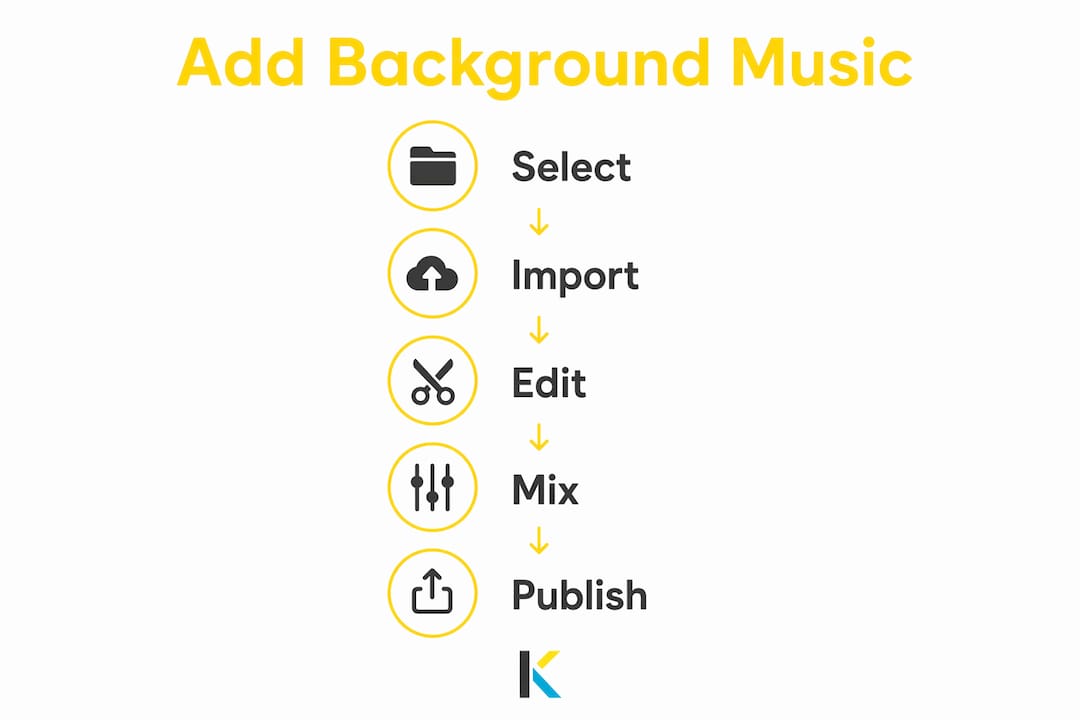
- Pick your mood. Filter by genre, BPM, or energy level to find a track that fits the scene in under a minute.
- Drop it into the timeline. No downloading, no re-importing, no format mismatches.
- Set mix levels and export. Adjust volume, apply fades, and hit publish with clearance metadata already attached.
That single-platform workflow cuts editing time and nearly eliminates the risk of a post-publish copyright claim.
Table of Contents
- How do you add background music to a video step by step?
- How do you choose the right music for your video?
- What should you verify before publishing licensed music?
- Practical audio-mixing tips so music doesn’t drown your dialogue
- How do platform rules affect your music choices?
- Why does an integrated music library speed up your whole workflow?
- Key Takeaways
- Why choosing music early makes better videos
- Kudoflix gives you music, editor, and clearance in one place
- Useful sources and further reading
How do you add background music to a video step by step?
- Open your project in an online editor that includes a built-in music library.
- Filter by mood or BPM. For a tutorial, try calm instrumentals at a moderate tempo suitable for instructional content. For a product demo, choose upbeat tracks with a tempo that helps maintain viewer attention.
- Preview in context. Play the track against your footage before committing. Listen for frequency clashes with any dialogue.
- Add to the timeline. Drag the track to an audio lane beneath your video clips.
- Trim to length. Cut the track at the natural end of a musical phrase, not mid-bar.
- Place under dialogue. Keep music on a separate lane so you can automate its volume independently.
- Apply fades. A 1–2 second fade-in at the start and a 2–3 second fade-out at the end prevent jarring cuts.
- Normalize loudness. Target around –14 LUFS for YouTube and –16 LUFS for most social platforms.
- Verify licensing. Confirm the track covers your intended platform and use type before you export.
Pro Tip: For voiceover-heavy videos, choose an instrumental “bed” — a track with no vocals and minimal high-frequency content. Vocals in the music compete directly with narration in the 2–4 kHz range, making both harder to understand.
How do you choose the right music for your video?
Music selection comes down to four decisions: mood, tempo, structure, and fit for the video type. Get these right and the soundtrack disappears into the story. Get them wrong and viewers notice the music before they notice anything else.

Mood sets the emotional contract with the viewer. Happy and uplifting tracks work for product reveals and family montages. Tense, minor-key tracks suit documentary segments or dramatic recaps. Calm, sparse arrangements support educational content where the viewer needs mental bandwidth to absorb information.
Tempo (BPM) controls perceived pacing. A mismatch between edit rhythm and music tempo makes cuts feel random. Broadly:
- Tutorials and explainers favor calm or neutral tempos appropriate to instructional pacing
- Social shorts and product demos suit upbeat and energetic tempos
- Emotional montages benefit from cinematic or ambient, slower tempos
- High-energy sports or action content use driving or electronic music with faster tempos
Instrumentation matters most when you have dialogue or voiceover. Tracks heavy in the midrange (guitars, piano, vocals) compete with speech. Ambient pads, strings, and bass-forward arrangements sit below the vocal range and leave room for narration. Professionally produced tracks with stems let you mute the competing elements entirely.
Practical library filters to use: genre, BPM range, instrumentation type, and “instrumental only.” Most integrated libraries support all four. Use them before you preview — it saves significant time on longer projects.
What should you verify before publishing licensed music?
Royalty-free music means you pay once (or subscribe) and use the track without paying per-stream royalties. It does not automatically mean unlimited use everywhere. The license scope varies by provider, and missing one item on this checklist can trigger a Content ID claim or, worse, a channel strike.
Before you publish, confirm:
- Commercial use rights. Does the license cover monetized videos, paid ads, or client deliverables? Free-tier tracks from some libraries require attribution or restrict commercial use entirely.
- Platform coverage. Is the track cleared for YouTube Content ID, TikTok, and Instagram? Some libraries provide automated channel clearance tools — enter your channel ID and the license links to your account.
- Client-channel clearance. Many subscriptions tie licenses to the subscriber’s account, not the end client’s channel. If you’re editing for a client, confirm the license transfers or request a per-channel link.
- Attribution rules. Some free libraries require a credit in the video description. Missing this can void the license.
- Territory and duration. A few licenses restrict use to specific countries or expire after a set period.
Pro Tip: When working for clients, always ask the music provider whether the license covers the client’s channel specifically. If it doesn’t, request a per-channel registration or license link before delivery — not after the video goes live.
Practical audio-mixing tips so music doesn’t drown your dialogue
Good mixing is mostly about separation. Music and dialogue occupy overlapping frequency ranges, so the goal is to keep them from fighting each other.
Core techniques:
- Ducking. Automate the music volume to drop 10–15 dB whenever dialogue or voiceover is present, then return to the ambient level during b-roll or transitions.
- High-pass filter on music. Roll off everything below 150–200 Hz on the music track if bass competes with a deep voiceover. Alternatively, use stems and simply mute the bass layer.
- Volume automation lanes. Manual automation gives you more control than a single static volume setting, especially for music that builds or drops dynamically.
- Beat matching. Cutting video edits to land on musical accents — a snare hit, a chord change — significantly improves perceived pacing compared with non-synced cuts. Most integrated editors show waveforms that make this visual.
| Setting | Target / Range |
|---|---|
| Duck depth | 10–15 dB below ambient music level |
| Fade in (music) | 1–2 seconds |
| Fade out (music) | 2–4 seconds |
| Export loudness (YouTube) | –14 LUFS integrated |
| Export loudness (TikTok/Reels) | –14 to –16 LUFS integrated |
Pro Tip: If the library offers stems and cut-downs, download the instrumental stem separately and use it under dialogue sections. Switch to the full mix only during intros, outros, or b-roll. The result sounds like a professional mix with almost no extra effort.
How do platform rules affect your music choices?
Each platform handles audio differently, and those differences affect both clearance and monetization.
- YouTube. Content ID scans every upload. A track not registered with your channel or account can trigger an automatic claim, which may redirect ad revenue to the rights holder. Libraries that offer channel ID entry or license links reduce this risk significantly. Always register your channel before uploading client work.
- TikTok and Instagram Reels. Short-form platforms favor loops of 15–60 seconds. Choose tracks with a strong hook in the first 15 seconds. Loudness normalization on these platforms is aggressive — mix to around –14 LUFS to avoid your audio sounding crushed after platform processing. Check platform-specific format guidance before exporting.
- Monetization impact. Using a track without explicit commercial or ad-use rights can block monetization on your video even if the track is “royalty-free.” Always confirm ad-use permissions separately from standard publishing rights.
Why does an integrated music library speed up your whole workflow?
Switching between a standalone editor and a separate music service adds friction at every step: download, convert, re-import, re-sync. An integrated library removes all of that.
Practical gains include faster search with in-context preview, direct import to the timeline with no file management, and license metadata attached to the track automatically. Kudoflix’s built-in royalty-free music pairs directly with its template and transition library, so a music-and-template combo can be assembled in minutes rather than hours. For creators producing multiple cuts for different social formats, that speed compounds quickly across a project.
Risk reduction is the other side. Editor-level license linking means the clearance follows the project file, not a separate download folder you might lose track of. Shared team libraries also mean every collaborator pulls from the same cleared catalog, which matters for small businesses and agencies managing client channels.
Key Takeaways
The most effective workflow for background music in video combines an integrated royalty-free library, proper license verification, and deliberate audio mixing to keep music supporting rather than competing with your content.
| Point | Details |
|---|---|
| Use integrated libraries | Preview and import tracks without leaving your editor to cut editing time and reduce licensing errors. |
| Verify license scope | Confirm commercial use, platform coverage, and client-channel clearance before every publish. |
| Choose instrumental beds for voiceover | Tracks without vocals avoid frequency clashes in the 2–4 kHz range where speech lives. |
| Apply ducking and loudness targets | Drop music 10–15 dB under dialogue; target –14 LUFS for YouTube and TikTok exports. |
| Kudoflix | Offers built-in royalty-free music, templates, and social export presets inside one browser-based editor. |
Why choosing music early makes better videos
Most creators treat music as the last thing they add. That’s backwards. Music sets the emotional tempo of a video before a single cut is made, and editing to a track you’ve already chosen produces tighter pacing almost automatically.
The argument for picking music first isn’t sentimental. When you know the BPM and energy curve of a track, you cut to its rhythm rather than forcing the rhythm onto footage after the fact. Color grading and effects can be adjusted in minutes; re-editing a sequence because the music doesn’t fit costs hours. Integrated libraries make this practical because you can test three or four tracks against your rough cut in the time it used to take to download one file from a separate service.
Kudoflix gives you music, editor, and clearance in one place
Skip the tab-switching. Kudoflix’s online video editor includes a built-in royalty-free music library you can filter by mood, BPM, and instrumentation, then import to your timeline in one click. Every track comes with license metadata attached, so platform clearance isn’t an afterthought.
Features that map directly to what this article covers: instrumental stems for voiceover projects, social export presets calibrated for YouTube, TikTok, and Instagram Reels, and template-plus-music combos that cut production time on repeat formats. No downloads, no installs, no juggling separate services. Start a free project at Kudoflix and add a licensed track to your first video today.
Useful sources and further reading
- Free Music Archive — independent artists, free to download, safe for YouTube and podcasts
- Pixabay Music — large no-copyright catalog with background tracks across genres
- Bensound — royalty-free tracks cleared for YouTube, TikTok, Instagram, and Vimeo with channel ID tools
- Mubert AI Music Generator — AI-generated background tracks with plan-based commercial rights
- MusicGenerate — on-demand royalty-free loops for YouTube, podcasts, and commercial use
- Kudoflix music sync techniques — hands-on guide to beat matching and stem workflows inside the editor
Recommended