
Royalty free music means you pay no ongoing royalties per play or per stream, but you still need a valid license before you use the track. “Free to download” and “royalty-free” are not the same thing. The fastest, lowest-risk path for most creators is an editor-integrated library that generates a documented license receipt the moment you add a track to your project. Kudoflix includes exactly that: a built-in royalty-free music library tied directly to your project files, so your license record lives where your edit does.
Table of Contents
- What royalty-free music actually means — and what people get wrong
- Where creators typically find licensed tracks — and which source fits your project
- How to verify a track’s license before you publish
- Free vs. paid models: what you actually get at each price tier
- Using licensed tracks on YouTube, TikTok, Instagram, and podcasts
- Why Kudoflix’s built-in library makes licensing faster
- Key Takeaways
- The habit that actually keeps creators out of trouble
- Kudoflix gives you licensed music inside the editor, not as an afterthought
What royalty-free music actually means — and what people get wrong
Royalty-free does not mean free. It means the license you purchase (or receive for free under certain conditions) does not require you to pay a royalty every time someone plays your video. You pay once, or you subscribe, and then you can use the track as many times as the license allows without owing additional fees per view.
Three terms get confused constantly:
- Royalty-free: A one-time license fee (or subscription) covers all future plays. No per-stream payments. A license document is still required.
- Public domain: The copyright has expired or was never claimed. No license needed. Classical recordings on Musopen are a good example, though individual recordings may still carry separate rights.
- Creative Commons: A spectrum of licenses. CC0 is effectively public domain. CC BY requires attribution. CC BY-SA requires you to share derivative works under the same terms. CC BY-NC prohibits commercial use entirely.
The biggest misconception? That a “royalty-free” label on a track means you can download and use it anywhere without reading the fine print. That is not how it works. Some platforms offer free downloads with commercial rights; others require a subscription before commercial use is permitted. Always read the license page, not just the marketing copy.
Here is the kind of language that actually matters in a license:
If the license text does not specify platforms, duration, and commercial use, it is incomplete.
Where creators typically find licensed tracks — and which source fits your project
Not all music sources are equal, and the right one depends on what you are making.

Built-in editor libraries
Platforms like Kudoflix embed a curated music library directly in the editor. The license is generated automatically when you select a track, and the receipt stays attached to your project. Zero extra steps, zero separate downloads. Best for: social clips, family videos, business presentations, and any project where speed and documentation matter equally.
- Pros: Instant license documentation, no platform-switching, tracks pre-cleared for major platforms.
- Cons: Smaller catalog than standalone libraries; selection tied to the platform’s curation.
Free community libraries
Sites like Free Music Archive and Pixabay host tracks under various Creative Commons or custom licenses. Many are genuinely free for commercial use, but you must read each track’s individual license. Quality varies widely.
- Pros: No cost, large volume, some excellent independent artists.
- Cons: Inconsistent licensing clarity, no centralized documentation, attribution often required.
Subscription libraries with owned rights
When a platform owns or controls the master and publishing rights, it can grant a globally applicable license that covers monetization across platforms. Platforms that own rights eliminate the middleman confusion that aggregator libraries create. Best for: client work, branded content, documentary scoring, and any project that will run as a paid ad.
- Pros: Clear, comprehensive rights; often includes stems; Content ID pre-clearance.
- Cons: Monthly or annual cost; perpetual license language varies by plan, so check whether your rights survive a canceled subscription.
Per-track marketplaces
You pay once per track and receive a license for that specific use. Good for one-off projects where you need a specific sound and do not want a subscription.
- Pros: Permanent license for that track, no recurring cost.
- Cons: Costs add up quickly across multiple projects; stems often sold separately.
Custom or commissioned music
A composer writes original music for your project. You own the result outright (if the contract says so). Best for: high-budget productions, brand anthems, or anything where uniqueness is the point.
- Pros: Fully original, no Content ID risk, exclusive rights possible.
- Cons: Expensive and time-consuming.
Pro Tip: Use curated mood playlists rather than browsing by genre. Matching the emotional arc of your video to a pre-filtered playlist cuts search time dramatically and produces better results than hunting track by track. Editors who sync music to edits by mood rather than tempo alone report faster assembly and fewer late-stage music swaps.
How to verify a track’s license before you publish
Skipping this step is where most claims originate. Run through this checklist every time.
- Find the written license. Not the FAQ. Not the “about” page. The actual license document or license page for that specific track or plan.
- Check permitted uses. Does it explicitly cover commercial use? Social media? Podcasts? Ads? If a use case is not listed, assume it is not covered.
- Check territory and duration. “Worldwide” and “perpetual” are the phrases you want. Regional or time-limited licenses create problems when content stays live for years.
- Confirm attribution requirements. Some free licenses require a credit link in the video description. Missing that link can void the license entirely.
- Download and save the license receipt. Screenshot it, save the PDF, or copy the license URL into a dedicated folder. You need this if a claim arrives six months later.
Red flags to walk away from:
- A “no copyright” label with no legal text behind it
- License terms buried three clicks deep in a FAQ
- No mention of YouTube, TikTok, or Instagram by name
- No downloadable proof of license
- A track registered in Content ID with no documented license for your use
Reputable platforms state clearly whether a track is cleared for commercial use, social media, and podcasts, either on the license page or in a downloadable receipt. If that clarity is missing, move on.
Here is the kind of platform-coverage language that signals a solid license:
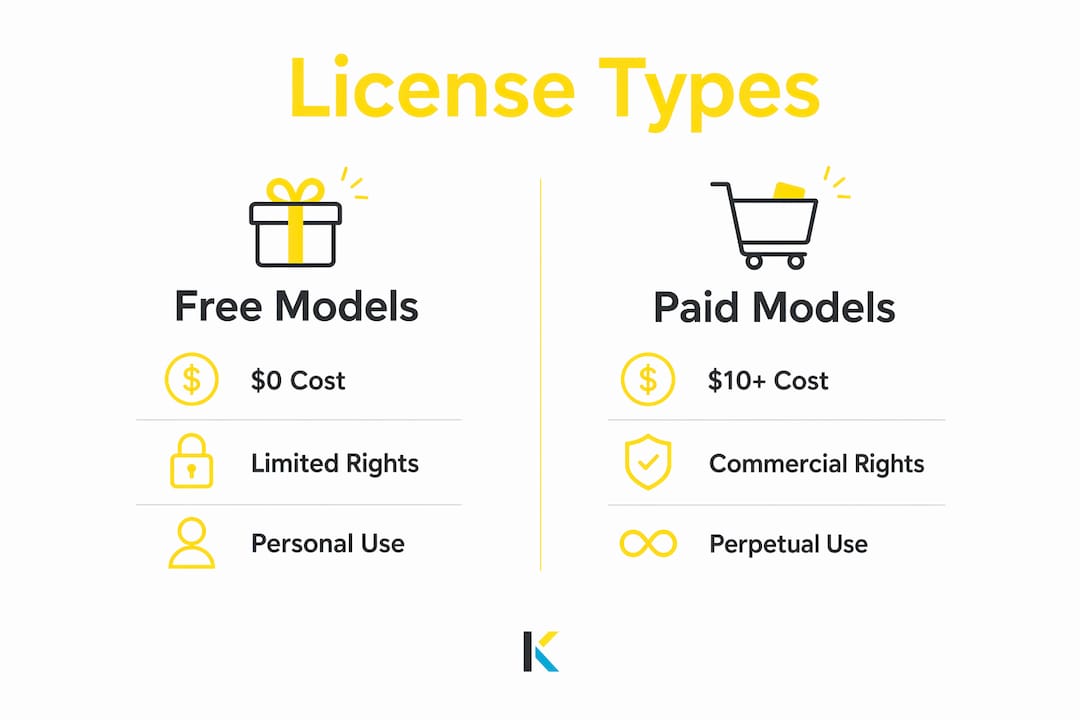
Free vs. paid models: what you actually get at each price tier

| Model | Typical cost | What’s included | Best for |
|---|---|---|---|
| Free with conditions | $0 | License active only if attribution/link requirement is met | Personal projects, small YouTube channels |
| Per-track license | — | Perpetual license for one track, one use case | One-off projects, specific sound needs |
| Subscription library | — | Access to full catalog; perpetual rights for published projects (check terms) | High-volume creators, agencies, client work |
| Buyout / owned-rights | Varies | Full rights, often including stems and exclusivity options | Commercial ads, TV, brand campaigns |
The free tier works fine for personal content, but free libraries often lack commercial rights that larger projects require. The moment a brand pays you to include their product in a video, or you run the content as a paid ad, you need a license that explicitly covers commercial use. A subscription library with owned rights is usually the most cost-effective answer for creators who publish regularly.
One detail most creators overlook: check whether your subscription grants perpetual rights for projects published during an active plan. Some platforms revoke rights if you cancel. Others lock in perpetual coverage per published project regardless of subscription status. That distinction matters enormously when a video you made two years ago is still generating revenue.
Pro Tip: If you expect to reuse a track across multiple projects or platforms, a subscription with perpetual per-project rights is almost always cheaper than buying the same track repeatedly. Compare the free vs. paid tradeoffs before committing to either model.
Using licensed tracks on YouTube, TikTok, Instagram, and podcasts
Content ID does not read license agreements. It matches audio fingerprints. A track can be fully licensed to you and still trigger an automated claim if the rights holder has registered it in YouTube’s Content ID system.
Here is how to protect yourself before and after upload:
- Before upload: Confirm the track is pre-cleared for Content ID, or that your provider offers Content ID whitelisting for your channel.
- Save your license receipt with the project file. Include the track name, license number or URL, and the date of purchase or download.
- Add the required credit link in the video description if the license requires one. Some free licenses, like certain lifetime video-level licenses, are only active when that link is present.
- Connect your accounts where the platform supports it. Some music providers allow you to register your YouTube channel directly, which reduces automated claim frequency.
- If a claim arrives: Do not panic and do not immediately dispute without evidence. Gather your license receipt, the track name, and the provider’s contact information.
- File the dispute through YouTube’s Content ID dispute form. Paste your license details into the dispute reason field. Most legitimate providers resolve these within a few days.
- If the dispute is rejected: Contact your music provider directly. Providers who own their rights can intervene with YouTube on your behalf. If the provider cannot help, escalate to YouTube’s Creator Support.
For TikTok and Instagram, the process is less formalized. Both platforms have their own licensed music libraries, and tracks outside those libraries carry higher claim risk. For podcasts, Content ID is not a factor, but ASCAP, BMI, and SESAC performance rights still apply to music played in a podcast if the track is not genuinely royalty-free.
When and how to credit music: copy-ready attribution examples
Attribution is not optional when the license requires it. Here are two ready-to-paste examples.
For a Creative Commons CC BY track:
For a free licensed track requiring a credit link:
Pro Tip: Put attribution in the video description, not on screen, unless the license specifically requires an on-screen credit. Keep the license URL live and accessible. If the platform ever changes the URL, update your description immediately, because a broken license link can look like a missing license during a dispute.
Why Kudoflix’s built-in library makes licensing faster
Using a standalone music library means switching tabs, downloading files, tracking receipts separately, and hoping nothing gets lost before a claim arrives. Kudoflix handles this differently.
- In-editor search and filters: Browse by mood, tempo, and genre without leaving your project.
- Automatic license documentation: Every track you add to a Kudoflix project generates a license record tied to that project file.
- Perpetual coverage for published projects: Tracks used in published projects remain covered, so you are not scrambling if your plan changes later.
- Curated playlists and stems access: Filter by emotional tone to find the right track fast, and use stems to balance music against voiceover without losing energy.
- Template integration: Kudoflix’s music and transitions library pairs directly with its template system, so the audio and visual pacing are already matched when you start.
- Project storage with license metadata: License records stay attached to project files in storage, which means you can pull up proof of license months or years after publishing.
The verification checklist from earlier shrinks to a single step when you use an integrated library: select the track, and the documentation is done. That is the practical difference between a workflow that takes five minutes and one that takes fifty.
Key Takeaways
Royalty-free music requires a documented license every time, and the license must explicitly cover your platform, use case, and territory.
| Point | Details |
|---|---|
| “Royalty-free” is not “free” | You still need a valid license; the term only means no per-play royalties are owed. |
| License must name your platforms | Generic “royalty-free” labels without platform coverage leave you exposed to Content ID claims. |
| Perpetual language protects you | Look for “perpetual” or “lifetime” in the license so rights survive a canceled subscription. |
| Save every license receipt | Store receipts with project files so you can dispute claims months or years after publishing. |
| Kudoflix documents licenses automatically | The built-in library ties license records to each project, cutting the verification checklist to one step. |
The habit that actually keeps creators out of trouble
Most Content ID claims do not happen because a creator used the wrong music. They happen because the creator cannot prove they used the right music. The license existed; the receipt did not.
The fix is almost embarrassingly simple: treat your license receipt the same way you treat your project file. One folder, named by project, containing the edit file, the export, and the license documentation for every track. That folder is your legal defense if a claim arrives in two years when the video is still live and earning.
A second habit worth building: run a pre-publish checklist before every upload. Confirm the track name, confirm the license covers the platform you are publishing to, confirm any required attribution link is in the description. Three checks, thirty seconds. Creators who do this consistently report far fewer disputes, and when disputes do arrive, they resolve faster because the evidence is already organized.
The deeper point is that music licensing is not a one-time decision. Platform policies change. YouTube updates its Content ID rules. A music provider might change ownership and alter licensing terms for future tracks. Checking your provider’s license page once a year, and re-reading the terms when you renew a subscription, keeps you ahead of those shifts rather than reacting to them after a claim.
For creators working across multiple platforms, social media video formats carry different audio constraints. A track cleared for YouTube may still face restrictions on TikTok if the provider has not negotiated platform-specific rights. Know which platforms your license covers before you repurpose content.
Kudoflix gives you licensed music inside the editor, not as an afterthought
Hunting for tracks on a separate site, downloading files, saving receipts manually, and then hoping nothing gets lost before a claim arrives is the old way. Kudoflix puts a curated licensed music library inside the editor itself, so the moment you pick a track, the license is documented and attached to your project. No tab-switching, no separate receipt folder to maintain. For video makers, podcasters, and social creators who publish regularly, that integration alone removes the most common source of copyright headaches. Open the Kudoflix online video editor, search the built-in music library by mood or genre, and your license record is created automatically. Your documentation is ready before you even hit export.
Authoritative sources and quick links for license verification
When you need to verify a license or understand platform rules, go directly to primary sources. Here is where to look:
- Free Music Archive: Browse tracks by license type; check each track’s individual license before downloading for commercial use.
- Musopen: Public domain and Creative Commons classical recordings; click the license icon on each track for specific restrictions.
- Bensound: Clear per-track and subscription license pages; perpetual license language confirmed on the pricing page.
- Pixabay Music: Free downloads under the Pixabay Content License; read the license page for commercial use terms before downloading.
- YouTube Help: Content ID: The authoritative explanation of how Content ID works and how to dispute claims.
- Creative Commons License Chooser: Use this to understand what each CC license variant requires before you use or share a CC-licensed track.
- WhisprStream blog: Covers audio embedding and streaming workflows, useful if you are integrating licensed music into web projects or apps.
Download and save the license receipt for every track you use. A link to the license page is a good start; a downloaded PDF or screenshot is better. Platforms change URLs, and a broken link during a dispute looks identical to a missing license.
Recommended