

Most of what lifts video engagement happens in the edit, not in the camera: a first few seconds that earn the next ten, vertical framing, readable captions, a clear next step and a cut that keeps the pace up. You can do all of that in a browser with Kudoflix, our online video editor, with nothing to download or install. Below is the routine, step by step, with the evidence behind each step.
Key Takeaways
- Decide the audience, the platform and one goal before you cut anything. The goal tells you which number to watch.
- Open with a direct, visual first few seconds. Viewers decide very fast whether to keep watching.
- Format for the platform: 9:16 vertical for Reels, TikTok and Shorts, with text kept inside safe areas, and captions for sound-off viewing.
- Ask for one specific action, such as comment, share or save, and earn it with a real payoff rather than clickbait.
- Track two or three metrics tied to your goal, compare similar posts, and change one thing at a time.
Table of Contents
- What “engagement” actually means for video
- Step 1: Pick the audience, the goal and the platform
- Step 2: Shoot or collect material that edits well
- Step 3: Hook viewers in the first seconds
- Step 4: Format for the platform, not just the screen
- Step 5: Add captions, text and sound
- Step 6: Tell a story and give people a reason to react
- Step 7: Measure, then change one thing
- Where templates save the most time
- Start editing with Kudoflix
- FAQ
- Sources
What “engagement” actually means for video
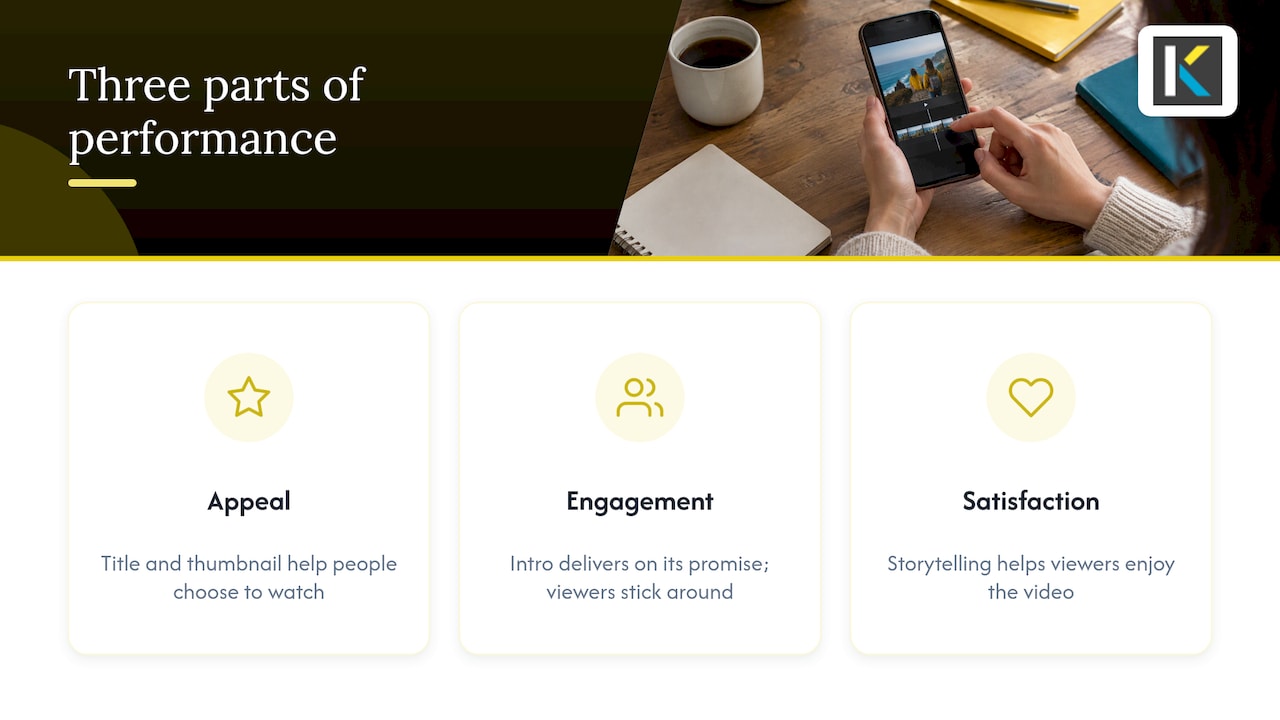
Engagement is not one number. YouTube’s own guidance for creators splits performance into three parts: appeal (do people choose to watch), engagement (do they stick around) and satisfaction (did they enjoy it). A strong title and thumbnail win the first, an intro that delivers on its promise wins the second, and storytelling wins the third.
Video also changes how people react. A 2020 study in the Journal of Interactive Marketing looked at 1,038 Facebook and Instagram posts and found that video encouraged more active engagement, such as comments, while photos drew more passive likes. The effect depended on the platform and the content, so treat it as a reason to use video, not a guarantee.
For most readers here, whether a family sharing a trip, a club showing its season or a shop owner promoting a product, that means one thing: people should watch to the end and then do something small.
Step 1: Pick the audience, the goal and the platform
Before you open an editor, answer three questions.
- Who is it for? Grandchildren, club members and local customers need different videos.
- What is the one goal? Sprout Social’s strategy guide suggests defining the audience’s needs and the video’s primary objective first, then choosing a platform whose audience and conventions fit both. Search Engine Land lists awareness, engagement, lead generation, sales, education and search visibility as possible objectives and says the goal should guide both content and measurement.
- Where will it live? A travel slideshow for relatives suits a different platform than a 20-second offer for local shoppers.
Write the answers in one sentence: “This video shows [audience] how [thing], so they [action] on [platform].” Every later choice, from length to music, gets easier.
Step 2: Shoot or collect material that edits well
Good engagement starts with footage you can work with. The University of Zurich’s video guidelines for social media recommend a tripod, clear audio, varied perspectives, attention to lighting and background, and leaving room in the frame for later cropping and captions.
For photo slideshows, such as a life-story slideshow made from old family pictures, the same logic applies. Choose fewer, better photos, keep subjects away from the edges so they survive a vertical crop, and gather a few short clips or voice recordings to break up the stills.
Two habits save time later:
- Film a few extra seconds before and after each moment so you have room to trim.
- Capture a close-up, a wide shot and a detail of the same scene. Cutting between them keeps the eye moving.
Step 3: Hook viewers in the first seconds
The opening is where most videos are lost. Hootsuite’s video guide advises capturing attention in the first few seconds with an intriguing visual, a bold statement or a question, and its social marketing specialist says viewers decide within about three seconds whether to continue.
Which opening works best? An analysis by Vista Social of 1.2 million organic posts from 22,000 brand profiles found that bold-claim or direct-statement openings were associated with 2% to 6% higher engagement across all seven networks studied, while question openings were associated with 2% to 9% lower engagement. The report presents observational comparisons, not proof of cause, so use it as a starting point for your own tests.
Practical ways to build a hook in the edit:
- Start with the best moment. Move the funniest, most surprising or most beautiful shot to second one, then go back to the beginning.
- State the point. “This $5 trick saved our trip photos” beats a slow logo animation.
- Put a short text line on screen in the first frame so viewers who scroll with the sound off still get the message.
In Kudoflix you can add dynamic text and effects for that opening line, and drag the strongest clip to the front of the timeline in seconds. Our guide to holding viewers on TikTok goes deeper on pacing.
Step 4: Format for the platform, not just the screen
Keep the core message, but reshape the video for where it will play. Reels, TikTok and Shorts all commonly use 9:16 vertical video, and Sprout Social recommends platform-specific content, captions and calls to action.
A quick planning table:
| Platform type | Typical shape | Edit focus |
|---|---|---|
| Short vertical feeds (Reels, TikTok, Shorts) | 9:16 vertical | Fast hook, big text, captions, trimmed pauses |
| Longer video feeds | 16:9 or 1:1 | Story arc, chapters, a clear promise in the intro |
| Stories | 9:16 vertical | One idea, text kept clear of the screen edges |
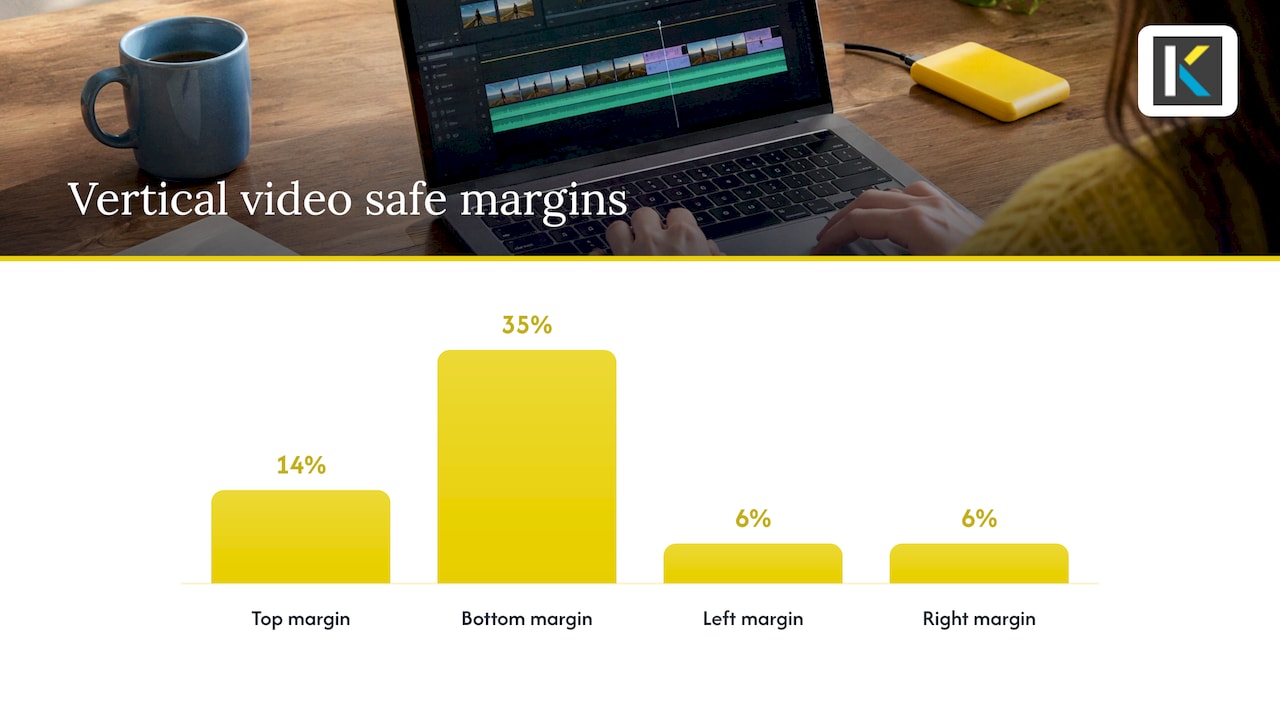
Keep text away from the zones that apps cover with buttons and captions. Meta’s advertising guidance for vertical Reels and Stories asks you to keep text and logos clear of the top 14%, bottom 35% and 6% on each side of the frame. Treat that as a safe margin for any vertical video.
Kudoflix has pages built around this step: adapting edits for short and vertical formats, video sizes for every platform and creating videos for TikTok, Instagram and YouTube. If you are unsure how long a video should run, see our note on promotional video length. For which formats each network favors, see the most engaging formats on TikTok, Instagram and YouTube.
Step 5: Add captions, text and sound
Many people watch with the sound off, in a waiting room, on a train or in bed next to someone asleep. On-screen text lets them follow along. It also helps viewers who are deaf or hard of hearing.
A few rules that make text pay off:
- Keep each line short, high contrast and on screen long enough to read twice.
- Read every caption back against what is said. Errors in automatic captions are common, and accuracy matters for accessibility.
- Keep text inside the safe margins from Step 4.
- Use one or two fonts across the video so it looks deliberate.
For sound, clear speech comes first. Viewers will forgive imperfect video more readily than muffled voices. Then add music that supports the mood. Kudoflix includes royalty-free music, so you can add a soundtrack to a family montage or a promo without hunting for licenses. You can also add effects, transitions and text in a few clicks, and use pro-style transitions to mark changes of scene without distracting from the story.
Step 6: Tell a story and give people a reason to react
People share what moves or surprises them. A study of 622 YouTube videos reported in MIT Sloan Management Review found that emotionally surprising content was associated with more liking and views. The same authors warn that fear or anger can raise views while risking negative attitudes toward what you share. So aim for delight and a real payoff, not shock or a misleading teaser.
In practice:
- Give the video a shape: a setup, a turn and a payoff, even in 20 seconds. Our video storytelling guide shows how.
- Cut dead air. Trim every pause, repeated shot and slow lead-in.
- Vary the shots. Alternate wide and close, still and moving, and use keyframes for a gentle zoom on a photo so stills feel alive.
- Deliver what the opening promised. That is the difference between a hook and clickbait.
Finish with one specific ask
Do not leave the next step unstated. Hootsuite recommends specific calls to action such as asking viewers to comment, share, download or click. Pick one. “Comment with the place we should visit next” works better than “like, share, comment, subscribe.” Put the ask in on-screen text in the last seconds, and say it out loud if the video has a voice.
Step 7: Measure, then change one thing
The last step turns a lucky post into a repeatable routine. The YouTube Creator Playbook for Brands recommends choosing no more than two or three KPIs, a KPI being the number you use to judge success, and matching them to the goal:
| Goal | Numbers to watch |
|---|---|
| Awareness | Reach and views |
| Attention | Watch time and completion |
| Engagement | Comments, saves, shares |
| Action | Clicks or conversions |
Look at where viewers drop off, compare similar posts on the same platform, and test one creative change at a time, such as a new opening line or a shorter cut. Sprout Social makes the same point about matching metrics to the purpose of the video: chasing views for a video meant to produce comments can miss the real objective.
If you want a worked method for reading retention curves, this 90-day YouTube analytics plan shows how to track where viewers stay or drop off over time.
Because Kudoflix runs in the browser, making a new version of a video for a test is quick: duplicate the project, swap the first clip or the text line, and export.
Where templates save the most time
Small businesses, clubs and busy parents often fail at consistency, not creativity. Posting regularly is part of Hootsuite’s advice, along with testing lengths and formats. Templates remove the blank-page problem: the layout, text styling and pacing are already set, and you drop in your own footage or photos.
Kudoflix offers an extensive library of exclusive templates. Browse the video templates for the online editor, see how templates save time, or look at examples made with Kudoflix to get a feel for what a club recap, a product promo or a travel slideshow can look like.
Start editing with Kudoflix
Kudoflix is online video editing software with no download or installation, so you can start on whatever device you have. Our cloud processing is designed to deliver polished results even on low-end devices. The plans are:
- FREE: $0 per month
- STARTER: $9.99 per month, or $83.88 per year
- PRO: $12.99 per month, or $119.88 per year
See what each plan includes on the Kudoflix pricing page.
Our view: engagement is an editing habit
We built Kudoflix on a simple belief: the people with the best stories to share are rarely video professionals. A grandmother’s travel photos, a club’s season highlights and a bakery’s weekly special all deserve to be watched to the end.
What stops them is usually friction: software to download, menus that look like an airplane cockpit, long waits to process a file. That is why we made an editor that runs in the browser, with templates, transitions, text, color filters, keyframes and royalty-free music in one place.
When the tool gets out of the way, you spend your effort on what research keeps pointing to: a strong opening, a clear shape, readable text and one clear ask. Then you can make a second version and a third, which is how engagement improves.
Mandrixx
FAQ
How do I increase engagement on my social media videos?
Start with a clear goal and platform, open with a direct, visual hook, and format the video for vertical viewing with captions. End with one specific call to action, then compare your results against your own recent posts and change one element at a time.
Is a 12% engagement rate good?
It depends on the platform and how engagement is defined. Buffer’s 2026 engagement report says definitions differ by platform and that its benchmarks are medians from its own published posts, not universal standards. A fairer test is whether your rate is rising against your own previous posts on the same platform.
How long should a social media video be?
There is no single best length. Hootsuite advises testing video length and formats for each platform and audience. Keep it as short as the story allows, and see our guide to promotional video length for more detail.
Do I need video editing experience to make engaging videos?
No. Kudoflix is made for beginners and professionals alike, with a simple interface and ready-made templates. You can start on the FREE plan at $0 per month and add more as your projects grow.
Sources
- Understand your content performance for YouTube (YouTube Help)
- The Role of Social Media Content Format and Platform in Users’ Engagement Behavior (Journal of Interactive Marketing)
- How to Build a Social Video Marketing Strategy (Sprout Social)
- A guide to creating social media videos (Search Engine Land)
- Video Guidelines for Social Media (University of Zurich)
- 17 Not-So-Secret Social Media Video Tips (Hootsuite)
- What Makes Social Media Content Perform (Vista Social)
- Video ad formats by platform
- Creating Online Videos That Engage Viewers (MIT Sloan Management Review)
- The YouTube Creator Playbook for Brands (Think with Google)
- A Marketer’s Guide to Social Video Engagement Metrics (Sprout Social)
- The State of Social Media Engagement in 2026 (Buffer)
- 90-Day YouTube Analytics Plan (UpNComer)
Recommended